Red Access Wins Globee Award for Innovation, Named Gold Winner and Best of Category for Cybersecurity Product of the Year


Share:


Protect work across browsers, AI, messaging, and more

Securing browser activity

Enterprise Browser Alternative
Protection Without Friction
STOP
THE CHASE


Safe Browsing with Red Access

Red Access Data Loss Prevention (DLP)

Red Access Browser Extension Protection

Red Access SaaS Security

Secure Contractor & BYOD Remote Access

Adopt cutting-edge technologies like WebView2 without sacrificing security

Control GenAI Use Without Blocking Innovation

Streamlined, frictionless web security

Stop credential theft and spoofed sites in real time

SSE Security Without Replacement

Govern Vibe-Coded Apps
STOP
THE CHASE

Lorem ipsum dolor sit amet,
consectetur

Lorem ipsum dolor sit amet,
consectetur

Lorem ipsum dolor sit amet,
consectetur

Lorem ipsum dolor sit amet,
consectetur

Lorem ipsum dolor sit amet,
consectetur
Lorem ipsum dolor sit amet,
consectetur
STOP
THE CHASE
Share:

ChatGPT Enterprise security is mostly settled by contract. OpenAI doesn’t train on workspace data by default, your admins set retention, and its staff can open conversations only for purposes it lists. The exposure sits one tab over. Same employee, same laptop, a personal account the workspace can’t see. For the category view, start with GenAI security.
Key takeaways
Inside a paid workspace, largely yes. OpenAI states on its enterprise privacy page, updated January 8, 2026, that it does not train on business data by default, encrypts it with AES-256 at rest and TLS 1.2+ in transit, and has completed SOC 2 Type 2 audits for both ChatGPT Business and ChatGPT Enterprise. Those are real commitments, and they’re in writing.
The question buyers need answered is narrower. ChatGPT Enterprise security refers to the controls that operate around the account, not the model: not the encryption, not the audit report, but the moment an employee chooses which ChatGPT account receives a prompt, a paste or a file. OpenAI governs everything after that choice. It never sees the choice itself.
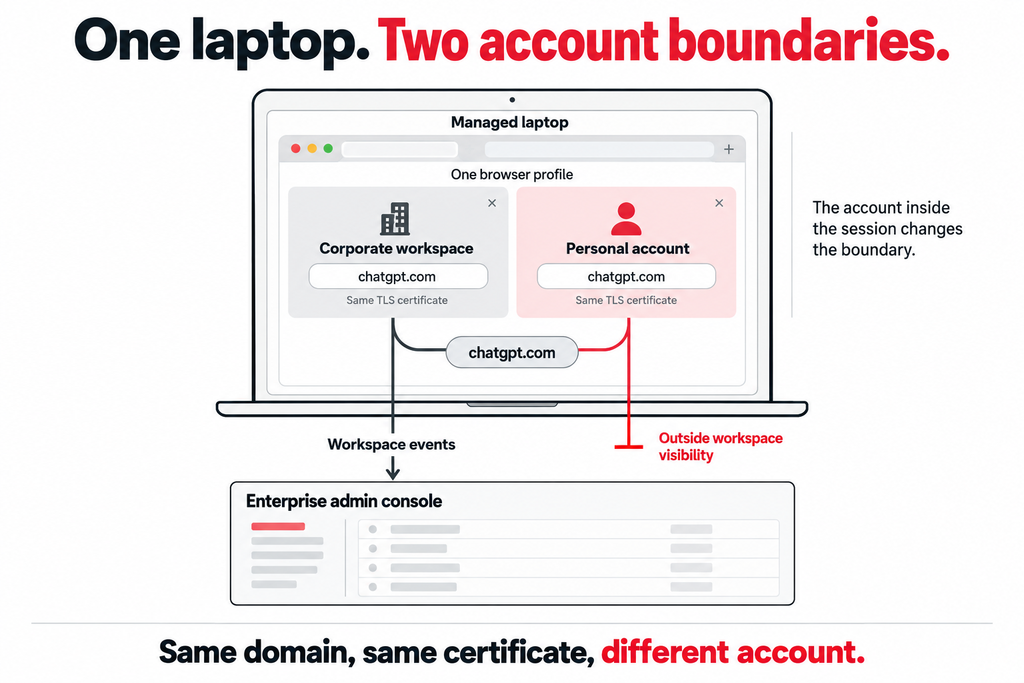
So the answer has two halves. The workspace is safe for business data. The account beside it isn’t covered at all. Call it the adjacent account: a personal Free, Go, Plus or Pro login in the same browser profile as the corporate workspace, one click away on the account switcher.
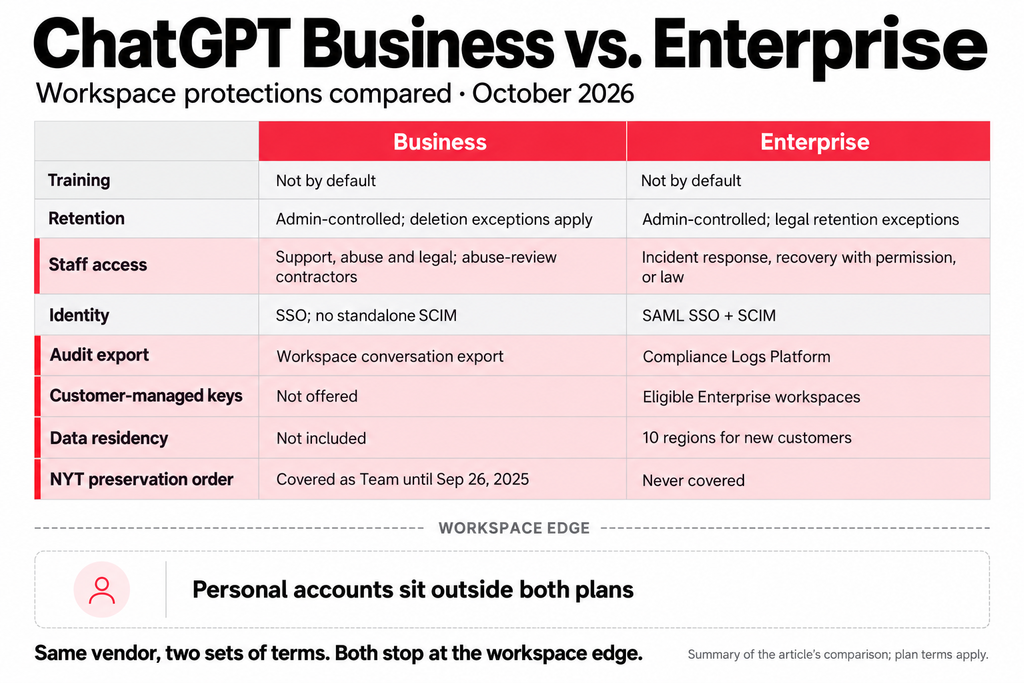
OpenAI’s commitments differ by plan more than most rollout decks admit. Here is how the two business plans compare as of October 2026, quoted from OpenAI’s own pages. ChatGPT Business is the plan called Team until OpenAI renamed it on August 29, 2025.
| ChatGPT Business (formerly Team) | ChatGPT Enterprise | |
| Training on your data | Not by default | Not by default |
| Retention | Admin-controlled. Deleted chats removed within 30 days unless law requires longer or it is “reasonably necessary to protect our services or any third party from harm” | Admin-controlled. Deleted chats removed within 30 days “unless we are legally required to retain them” |
| OpenAI access to chats | Authorized employees for engineering support, abuse investigation and legal compliance, plus “specialized third-party contractors” reviewing for abuse | Only for “resolving incidents, recovering end user conversations with your explicit permission, or where required by applicable law” |
| SSO and SCIM | SSO available; “a standalone ChatGPT Business plan does not include SCIM” | SAML SSO and SCIM provisioning |
| Audit export | Admins can view, export and delete workspace conversations | Compliance Logs Platform, which absorbed the Compliance API on December 11, 2025 |
| Customer-managed keys (EKM) | Not offered | Enterprise and Edu workspaces with a named OpenAI account representative |
| Data residency | Not included | Ten regions for new Enterprise customers, per OpenAI’s November 25, 2025 announcement |
| NYT preservation order | Covered as Team until obligations ended September 26, 2025 | Never covered |
The right-hand column is strong. Read it again and notice what every row describes: data inside the workspace. None of the rows mentions the adjacent account, because OpenAI can’t apply enterprise terms to a login the enterprise doesn’t own.
The preservation order shows why that matters. OpenAI’s response to the New York Times listed Free, Plus, Pro and Team data as held under the order, and Enterprise as unaffected. A personal Plus account used for work sat on the wrong side of that line.
Picture a product manager with the corporate workspace in one tab and a personal Plus account in the next, signed in since long before the company bought licenses. The personal account holds two years of their conversations, their custom instructions and the model picker they’re used to. When a deadline hits, the habit wins.
Measured usage says this is common. Cyberhaven Labs’ 2026 AI Adoption & Risk Report, released February 5, 2026 and based on billions of data movements, found that “32.3 percent of ChatGPT usage happens through personal accounts.” LayerX’s Enterprise AI and SaaS Data Security Report 2025 measured something different, the share of pastes rather than usage: 82% of pastes into GenAI tools came from unmanaged personal accounts. Two vendors, two methods. Same direction.
Personal ChatGPT accounts at work are an identity problem first. The domain is identical. The certificate is identical. What differs is the account inside the session, and a control that stops at the domain can’t tell them apart. Unmanaged laptops make it harder still, a case covered in enforcing AI policy without managing the endpoint. Even on a fully managed device, the adjacent account is one click away.
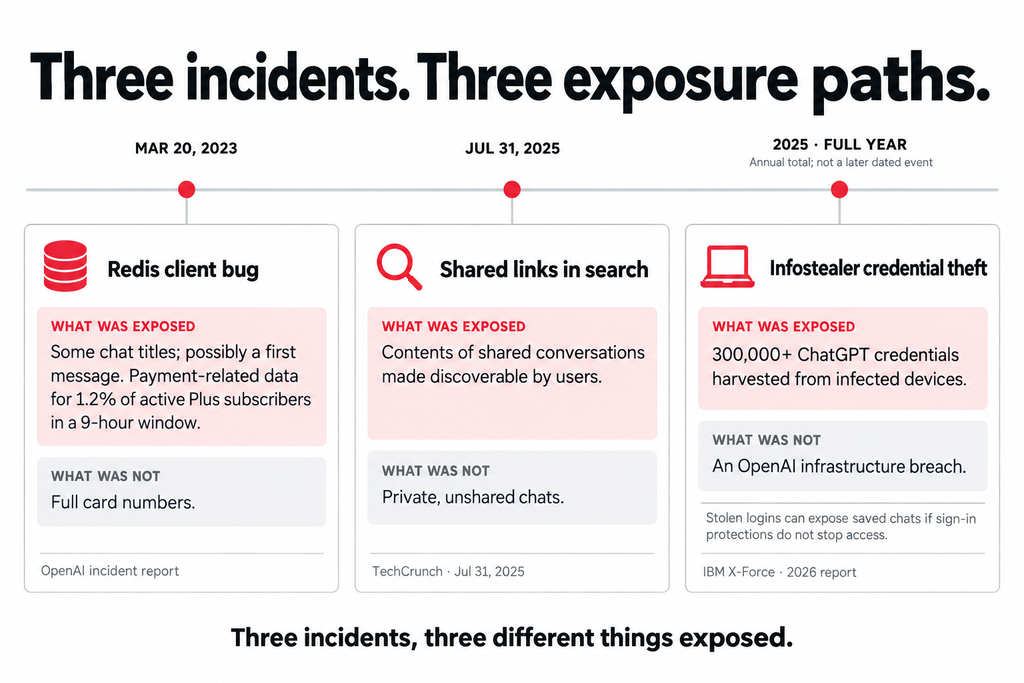
Not every ChatGPT data leak is a breach of OpenAI. Three dated incidents show the range: a bug on OpenAI’s side, a sharing setting, and theft from users’ own devices.
March 20, 2023: the Redis bug. A bug in the open-source redis-py client let some users see chat titles from another active user’s history, and possibly the first message of a new conversation. OpenAI’s incident report adds payment-related data for 1.2% of Plus subscribers active during a nine-hour window. What may have been visible: names, email and payment addresses, card type, the last four digits and expiry dates. What wasn’t: full card numbers.
July 31, 2025: shared links in search results. TechCrunch reported that shared ChatGPT conversations were appearing in Google, Bing and other search engines. Users who created a share link could switch on an option making it discoverable by search engines, and OpenAI removed that feature hours after the story ran. What leaked: whatever those shared conversations contained. What didn’t: private, unshared chats.
2025: credentials taken from infected devices. IBM’s 2026 X-Force Threat Intelligence Index reports that “infostealer malware led to the exposure of over 300,000 ChatGPT credentials in 2025.” What leaked: logins harvested from infected devices, not from OpenAI. What it exposes: every saved conversation in the account a login opens, unless MFA or SSO blocks the sign-in. A personal account has no IdP and no admin to notice a strange sign-in.
A domain block couldn’t have prevented the second or third without also cutting off the corporate workspace. That’s why URL filtering misses AI apps as a control for this problem.
A finance analyst on quarter close drags a revenue spreadsheet into ChatGPT to get a pivot table explained. In an Enterprise workspace, the file falls under workspace retention, admins can audit the conversation, and nothing trains on it by default. In the adjacent account, the same file sits under consumer terms. OpenAI says it trains on data from “versions of ChatGPT and other services for individuals” unless the user has switched off “Improve the model for everyone.”
Files carry more than prompts. A pasted paragraph is a sample. A spreadsheet is the ledger. LayerX’s 2025 report found that 40% of files uploaded to GenAI tools contained PII or PCI data.
Cleanup is weaker than it looks. OpenAI’s file upload documentation states that “deleting a chat does not delete a file that remains saved in Library,” and that Library files follow workspace retention in Enterprise, Edu and Healthcare workspaces. Business isn’t on that list. In a personal account, deletion depends on the employee remembering. Upload controls have to act at submission, because after that only the account holder can remove the file.
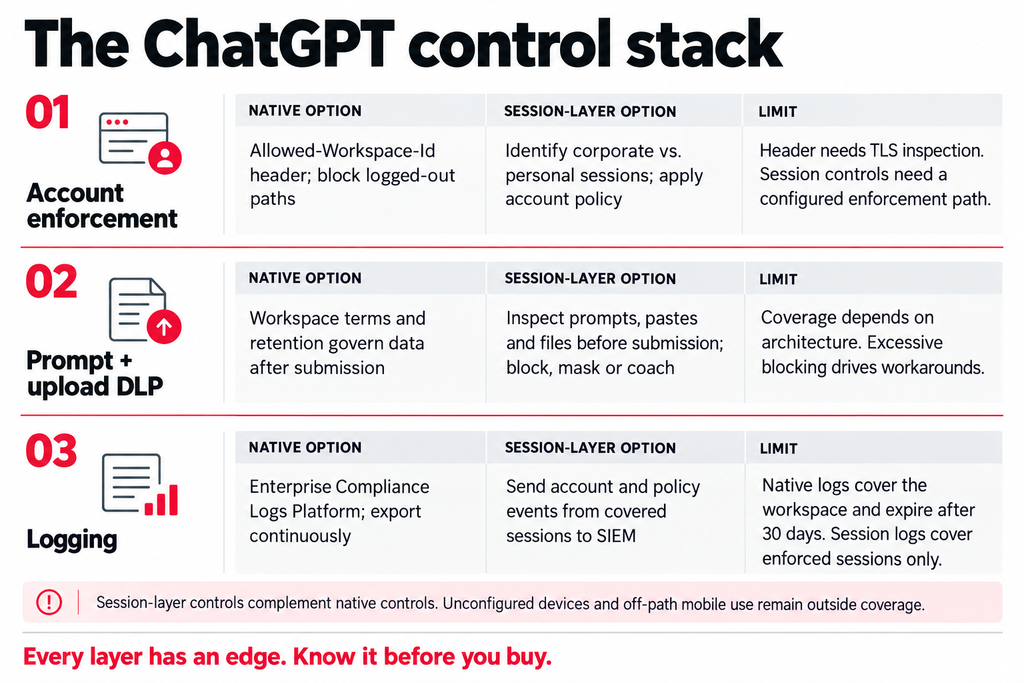
The control stack has three parts. Each has a limit worth knowing before procurement.
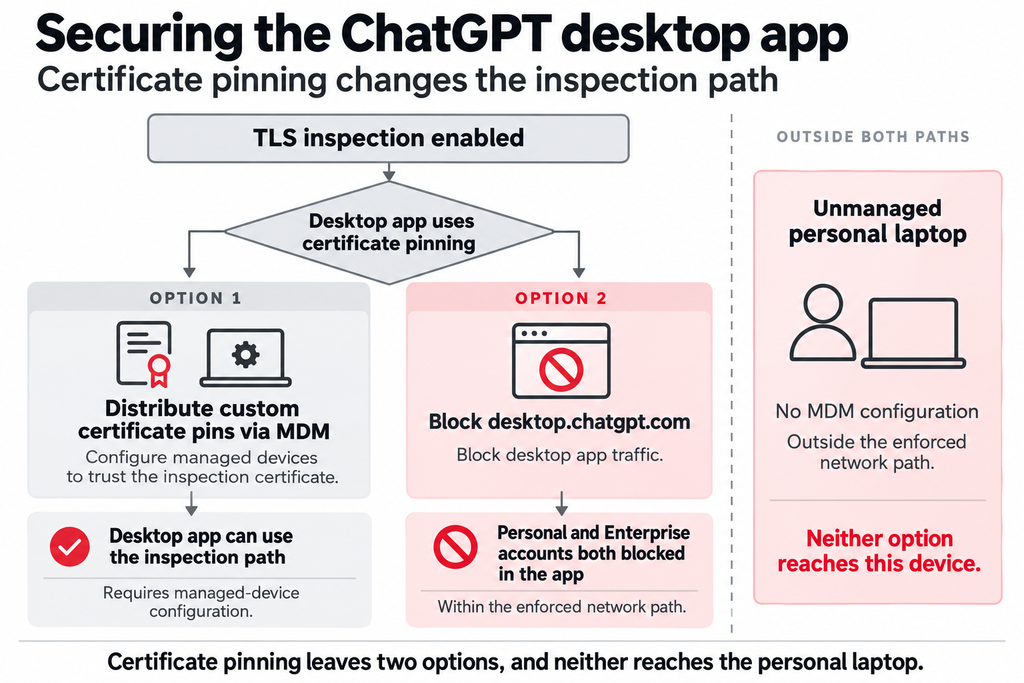
Corporate-account enforcement. OpenAI’s own answer deserves full credit. Its corporate network controls let Enterprise customers inject a ChatGPT-Allowed-Workspace-Id header at the proxy, after which “any other workspaces (including personal workspaces) are filtered out.” Blocking URLs that start with chatgpt.com/backend-anon/ stops logged-out use too. The limit: the header exists only on traffic you TLS-inspect. A laptop off the inspection path, or an app that rejects the inspection certificate, never receives it.
Prompt and upload DLP. Inspect the prompt, the paste and the file before submission, then block, mask or coach. Architecture decides what this sees. Agentless DLP covers at least five different designs, and only some can see a file at the moment it’s attached to a conversation. The limit is calibration: a control that blocks too often teaches people to reach for their phones.
Logging. The Compliance Logs Platform gives Enterprise admins time-windowed exports of conversation, authentication and admin events for SIEM and eDiscovery. Logs expire after 30 days, so pull them continuously. The bigger limit is structural. It logs the workspace, so the adjacent account leaves no record there. Session-layer enforcement fills that gap from the other side. Red Access identifies whether a ChatGPT session runs under a corporate or personal account, applies prompt and upload policy inside the session before data is submitted, and sends events to your SIEM. It complements the header. It doesn’t replace it.
OpenAI’s documentation is candid here. “ChatGPT desktop and mobile apps implement certificate pinning,” which means the apps refuse the certificate a proxy needs to read the traffic. OpenAI offers two ways forward: add your own certificates to the pin list and distribute them through MDM, or block desktop.chatgpt.com, which “blocks all traffic to the applications” for personal and Enterprise accounts alike. The first works on managed devices only. The second trades the risk for the tool. Neither reaches the employee who installs the desktop app at home and signs in to a Plus account.
The desktop app is a web session in a different container, the argument made at length in AI beyond the browser. Red Access’s published architecture delivers its engine into browser sessions embedded in desktop apps, ChatGPT Desktop among them, through a one-time OS-level configuration pushed via MDM, Intune or GPO.
The same test applied to the header applies to Red Access, and it has edges too. It doesn’t reach the ChatGPT mobile app on a phone outside the enforcement path, or a desktop app on a laptop nobody configured. USB transfers, local file operations and printing stay endpoint-DLP territory. The workable close for personal devices is identity: bind the corporate workspace to SSO and Conditional Access so it opens only through the enforcement path. The adjacent account stays personal, while the corporate workspace stops opening there. That identity boundary works alongside session-layer inspection: it limits where the corporate workspace can be accessed, while session-layer controls govern what users can send within the sessions that remain available.
Does ChatGPT Enterprise train on our data? Not by default. OpenAI’s enterprise privacy page says business data is used for training only if you explicitly opt in, for example through its feedback mechanisms. The same default covers Business, Edu, Healthcare and Teachers. Personal accounts work differently: OpenAI notes that rating a response with a thumbs up or down can make the entire conversation tied to that feedback eligible for training.
Can admins see employees’ personal ChatGPT use? No. Workspace admins see their own workspace, and OpenAI’s Compliance Platform covers workspace data only. A personal account belongs to the individual. OpenAI lets employees merge a personal workspace into the company one, but on Business, admins “cannot require a merge or deletion.” Visibility into personal use has to come from a control in the session or on the network that can tell which account is signed in.
How long does OpenAI keep deleted chats? OpenAI schedules deleted chats for permanent deletion within 30 days, unless it must keep them longer for security or legal reasons. Temporary chats may be kept for up to 30 days for safety purposes. Files added to a custom GPT’s knowledge persist until the GPT is deleted, and OpenAI notes that backups can hold deleted data for up to 30 additional days.
Does blocking chatgpt.com stop personal ChatGPT use? Not cleanly. A domain block stops the corporate workspace along with the personal one. The apps use their own hosts, including desktop.chatgpt.com, ios.chat.openai.com and android.chat.openai.com, and logged-out use runs through its own path. A domain block is an on-off switch, and the risk you’re managing depends on which account is signed in.
Is ChatGPT Business enough for regulated data? That depends on the regulation. Business carries a SOC 2 Type 2 report and a Data Processing Addendum, but it lacks EKM, data residency and the Compliance Logs Platform. For health data, OpenAI points buyers to ChatGPT for Healthcare, a workspace it describes as designed to support HIPAA compliance. Check each requirement against the plan before standardizing.
Do ChatGPT connectors change the risk? Yes, in a different direction. Apps let ChatGPT send and retrieve information from connected internal sources and third-party applications, and admins choose which ones are enabled. OpenAI says ChatGPT respects existing permissions and doesn’t train on app data by default. What an agent can reach and act on is its own subject, covered in our AI agent security guide.
If you’re deciding what to enforce around a ChatGPT Enterprise rollout, see how Red Access tells the corporate account from the personal one in the same browser →
Insights & Ideas

|
AI agent security governs what agents can access, connect to, and do. Map agentic AI risks, MCP…
|
ChatGPT Enterprise keeps workspace data out of training. The risk is the personal account one tab away.…

|
Microsoft Copilot security is a permissions problem first. Map every Copilot surface, set Purview DLP, block what…