Red Access Wins Globee Award for Innovation, Named Gold Winner and Best of Category for Cybersecurity Product of the Year


Share:


Protect work across browsers, AI, messaging, and more

Securing browser activity

Enterprise Browser Alternative
Protection Without Friction
STOP
THE CHASE


Safe Browsing with Red Access

Red Access Data Loss Prevention (DLP)

Red Access Browser Extension Protection

Red Access SaaS Security

Secure Contractor & BYOD Remote Access

Adopt cutting-edge technologies like WebView2 without sacrificing security

Control GenAI Use Without Blocking Innovation

Streamlined, frictionless web security

Stop credential theft and spoofed sites in real time

SSE Security Without Replacement

Govern Vibe-Coded Apps
STOP
THE CHASE

Lorem ipsum dolor sit amet,
consectetur

Lorem ipsum dolor sit amet,
consectetur

Lorem ipsum dolor sit amet,
consectetur

Lorem ipsum dolor sit amet,
consectetur

Lorem ipsum dolor sit amet,
consectetur
Lorem ipsum dolor sit amet,
consectetur
STOP
THE CHASE
Share:

An analyst uses an AI browser to work through the overnight support queue. The agent reads each ticket, opens the matching customer account in the CRM, drafts a reply, and updates the case through applications the analyst is already signed into. Every click is authenticated. Every action happens inside a legitimate user session. AI agent security starts with the question those controls can’t answer: which actions did the analyst ask for, and which did something the agent read tell it to take?
Key takeaways about AI agent security
AI agent security refers to the controls that govern what an agent can access, connect to, and do once it’s running. Not the model’s training data. Not the filter in front of a chat window. It covers the grants, connectors, and runtime actions of software that takes steps on its own, against live systems, with real credentials. It overlaps with GenAI security, which governs what people type into AI tools. Agents add the part where nobody is typing.
A chatbot returns text, and a person decides what happens next. An agent decides for itself. It plans a sequence of steps, picks tools, calls APIs with the credentials it was issued, and writes results into systems other people trust. NIST’s Center for AI Standards and Innovation drew the same line when it asked how to protect agent systems in January 2026, scoping the request to agent systems “capable of taking actions that affect external state.” Chatbots that don’t act on their own were left out.
Three things change at once. The input is untrusted, because agents read tickets, inboxes, and web pages written by strangers and treat every word of it as context for the next step they take. The identities are non-human. They multiply, too: Palo Alto Networks’ 2026 Identity Security Landscape, a vendor survey of more than 2,900 decision-makers, counts 109 machine identities, AI agents included, for every human one. And the decision happens at runtime. Long after anyone approved the grant.
The fair objection: this is non-human identity management under a new name. Half of it is. Agents need issued, scoped, revocable identities, and identity teams already own that lifecycle. The other half is new. A service account runs the same code on every call, but an agent picks its next call from whatever it just read, and nothing in the identity stack expects a principal that changes its plan halfway through a session. The surface moved too. AI outgrew the browser some time ago. Agents sit at its far edge.
The OWASP GenAI Security Project published its Top 10 for Agentic Applications on December 9, 2025, built with more than 100 contributors. Use its identifiers instead of inventing a taxonomy. Four of the ten cover most of the agentic AI security risks an enterprise meets first, and none of the four shows up in the signals most stacks still match on, which is why hashes, filenames, and URLs miss AI apps.
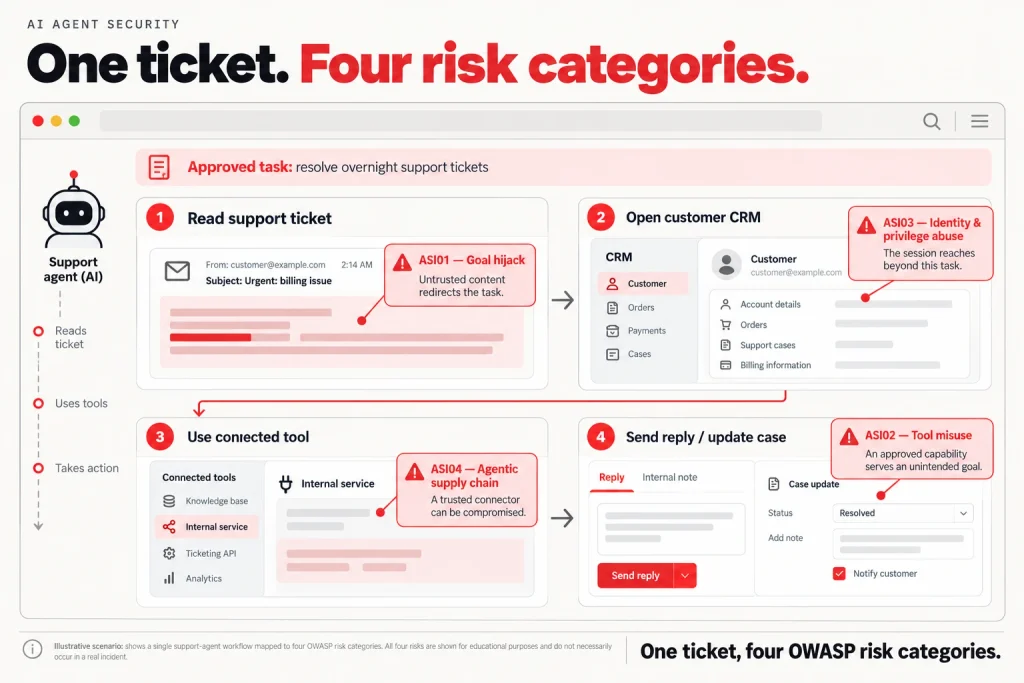
The rest of the list, from memory poisoning to rogue agents, matters more once agents start calling other agents. One more surface belongs here even though OWASP doesn’t name it as a category: AI browsers that click links, fill forms, and submit on a user’s behalf are agents running inside a live session, holding that session’s cookies and everything those cookies open.
A growing share of agent activity happens inside a user’s live browser or desktop session. AI browsers such as ChatGPT Atlas and Perplexity Comet, browser-driving agents such as ChatGPT agent, and desktop assistants with access to connected applications can navigate pages, click buttons, fill forms, and submit information on a user’s behalf. The important security distinction is where those actions happen: not in an isolated cloud function, but inside sessions that may already hold the user’s cookies, tokens, and permissions.
That changes what an attacker needs to compromise. A malicious instruction hidden in a webpage, email, document, or other content the agent reads can attempt to redirect the agent without compromising the user’s credentials or exploiting the browser itself. The agent already has authenticated reach. If the instruction succeeds, the same session that makes the agent useful can become the path for an unintended action.
This is not a theoretical risk class. In 2025, security researchers demonstrated indirect prompt-injection attacks against Perplexity’s Comet browser, including attacks in which content a user did not intentionally provide as instructions could influence agent behavior. OpenAI likewise identified prompt injection as a specific risk when it introduced Operator in January 2025 and has since described prompt injection as a continuing security challenge for browser agents such as ChatGPT Atlas. Research published in 2026 went further, demonstrating a successful cross-origin data-theft attack against Atlas in Agent Mode and identifying similar attack preconditions in other agentic browsers.
The OWASP categories introduced above land directly on this surface. A hostile page, message, or document can attempt to redirect the agent’s goal (ASI01). The agent can then misuse a legitimate capability such as submitting a form, sending a message, or uploading data (ASI02). And it performs that action using the authenticated reach of the user whose session it occupies (ASI03). The browser or desktop session is therefore both part of the attack path and a place where runtime policy can act.
The same pattern extends beyond dedicated AI browsers. Desktop AI applications, AI embedded in Office and collaboration tools, browser extensions, and IDE-level agents can all take actions through environments where a user is already authenticated. The implementation changes, but the security question stays the same: what is the agent doing inside the user’s session, and does that action match what the user intended?
Least privilege for agents is the old principle with new mechanics. The joint guidance CISA, NSA, and their Five Eyes partners published on May 1, 2026, Careful Adoption of Agentic Artificial Intelligence (AI) Services, says to “limit agent permissions to the minimum scope required for approved tasks.” That word “tasks” is doing a lot of work. A human role holds steady for months. An agent’s task changes every run.
Three practices hold up under that churn.
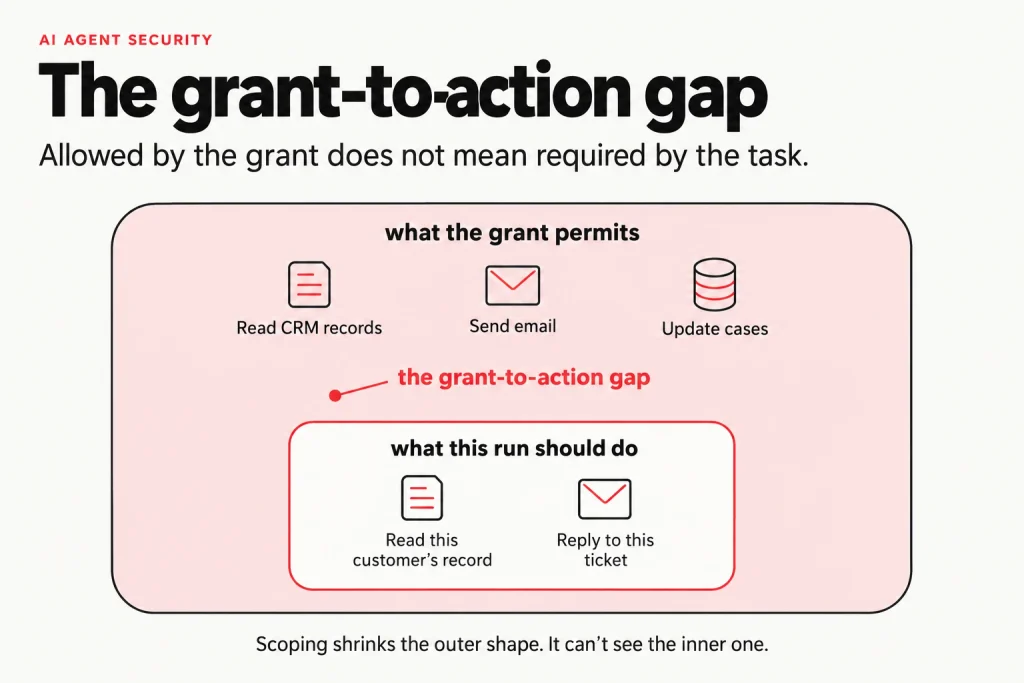
Then the limit. Scoping decides what an agent can reach. It doesn’t decide which of those things the agent does. Call it the grant-to-action gap: the distance between what a grant permits and what a given run should do. A support agent with read access to the CRM is correctly scoped and can still read every account in it, because a ticket asked. No permission model closes the gap. It opens after the permission check passes.
AI agent data leakage rarely looks like exfiltration. It looks like work. The agent reads a record because the task needed it, then writes it somewhere the task never required: a reply to the wrong customer, a public pull request, a ticket comment a vendor can see, a summary emailed outside the company. Every step uses an approved tool.
The same risk appears through four paths. The output path is the agent’s own legitimate action: an AI browser reads customer information from an authenticated CRM session, then pastes it into a public form because malicious content redirected the task. The connector path appears when a desktop AI assistant has access to connected business applications and sends a document or summary somewhere the user never intended, such as the wrong Slack or Teams channel. The tenant path appears when an integration fails to preserve the boundaries between users, workspaces, or organizations. The context path is quieter. Whatever the agent pulls into its working context may travel to the model provider with the next prompt and can also enter logs or other systems the organization has not classified.
DLP, in any of its deployment architectures, still earns its place. It catches what crosses its inspection points. Agents complicate that twice: their output is generated, so paraphrased or summarized data can slip past exact-match and fingerprint rules even when it carries the same sensitive content, and their writes usually travel as authenticated API calls from one sanctioned app to another, the kind of traffic network rules are written to allow. That’s the grant-to-action gap in data form. Nothing broke in. The data left through a door the agent was handed a key to.
AI agent governance runs as a program with stages, owners, and evidence. The joint Five Eyes guidance starts with a trusted registry of agents bound to authorized roles and tells teams to “periodically reconcile the registry against the live set of agents,” which turns inventory from a one-time project into a standing control. NIST’s CAISI says responses to its January request for information are meant to inform future voluntary guidelines. Until those land, four stages work. Each is a precondition for the next.
| Stage | Control | Owner | Evidence of done |
| 1. Inventoried | A registry of every agent, connector, and MCP server, sanctioned or not | AI governance lead | The registry matches live discovery on two consecutive checks |
| 2. Scoped | A distinct identity per agent, per-connector scopes, and just-in-time credentials | Identity team | No agent holds a standing credential broader than its task list |
| 3. Monitored | Logs of prompts, tool calls, and outputs, routed to the SOC | SOC | An analyst can reconstruct any agent run end to end |
| 4. Enforced | Policy checked at the moment of action, with approval gates for high-impact steps | Security architecture | High-impact actions are blocked or approved in line, not flagged the next day |
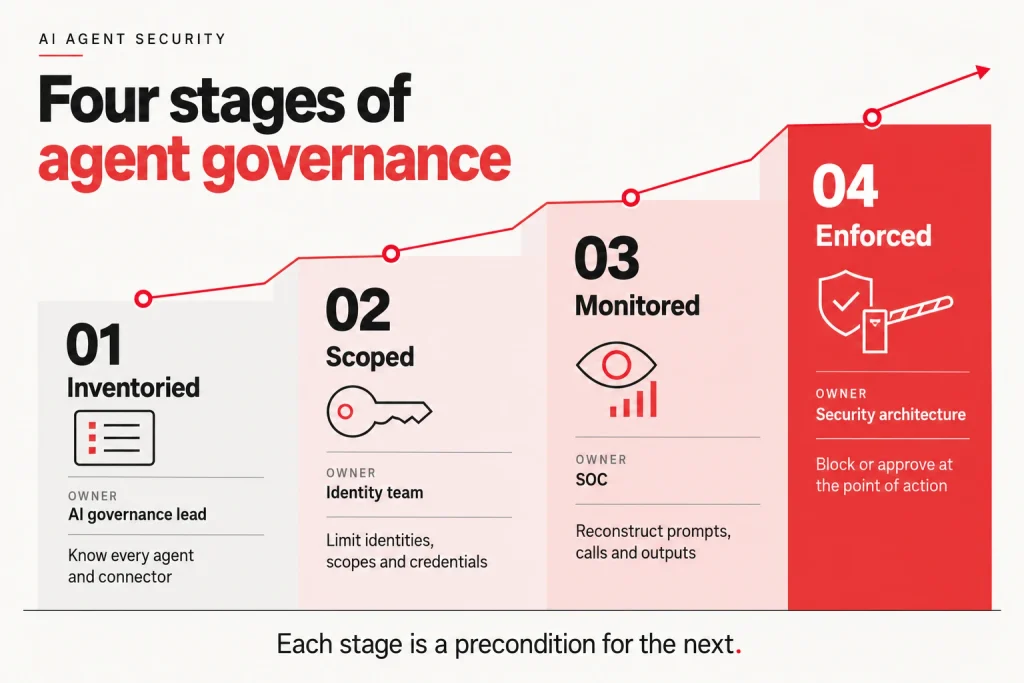
Plan for stage one to take longer than expected. The agents nobody registered are the ones a team built in an afternoon with an API key, and discovery finds them only if it looks in the places they actually run. The guidance also calls for human control so agents approved for low-risk tasks “cannot autonomously progress into higher-risk activities.” That’s a stage-four control written as a policy sentence. Without enforcement, it stays a sentence.
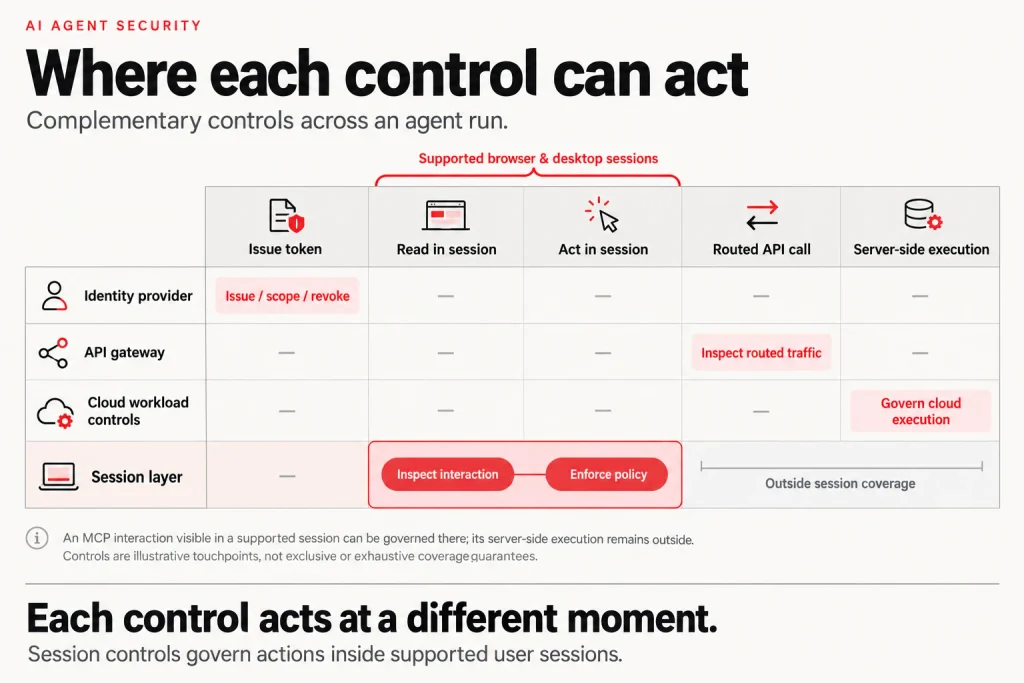
Stage four is where programs tend to run out of tooling. Identity controls act when a token is issued. API gateways act on traffic routed through them. Both are real controls, and both act before or beside the agent’s choice, not at it. The choice happens inside a working session: the tab an AI browser is driving, the desktop AI app calling a connector, the web form an agent fills in. That’s the session layer, argued at length in the layer the AI security stack is missing. It’s where the grant-to-action gap becomes visible.
Red Access works at that layer, governing AI activity inside browser sessions, desktop AI apps, embedded web surfaces, browser extensions, and other supported user-facing AI environments, and applying policy as the action happens. At that layer, the instruction malicious content attempts to introduce into the agent’s task (ASI01), the action or tool use that follows (ASI02), and the authenticated reach the agent uses to carry it out (ASI03) are visible as they happen because they occur inside a session where the control is present.
What it doesn’t cover also matters. An agent running as a cloud workload, calling APIs from a function with no user session behind it, sits outside the session layer, and the actions an MCP server takes on its own back end — the files it reads, the APIs it calls on its own, the data it stores — stay with identity, API gateway, and cloud-workload controls. Where an MCP interaction surfaces inside a user session that Red Access covers — a client calling an MCP server from a browser tab, a desktop AI app routing MCP data during a user’s task — that activity falls under the same session-layer policy as the rest of the session. A program needs both, and the question that sorts any claim of agent coverage, Red Access included, is: where does the agent act, and is the control standing there?
How Is Agent Governance Different From Governing ChatGPT or Copilot? Traditional GenAI governance often starts with what a person can type, paste, or upload into an AI tool. Agent governance adds what the software can do after that. An AI browser or desktop agent can navigate applications, click buttons, fill forms, use connected tools, and submit actions through sessions the user has already authenticated. That makes permissions and data controls necessary but not sufficient: organizations also need visibility and enforcement around the actions the agent takes at runtime.
Does Red Access Govern Agents Built on Connectors Like MCP? Red Access governs the user-session side of agent activity where supported agents operate — inside browsers, desktop AI applications, extensions, embedded web surfaces, and similar interactive environments. An MCP interaction that surfaces in one of those sessions, such as a client calling an MCP server from a browser tab, falls under the same session-layer policy as the rest of the session. It does not govern server-side MCP execution — what a server reads, writes, and calls on its own back end — or an autonomous cloud workload making API calls with no user session behind it. Those parts of the architecture belong to identity management, API gateways, and cloud-workload security. A complete agent security program needs both: controls over the agent’s server-side identities and connectors, and runtime controls where user-facing agents actually take actions.
Do AI agents need their own identities? Yes. An agent running on a person’s credentials inherits everything that person can reach, and its actions look identical to theirs in the logs. A distinct identity per agent is what makes scoping, revocation, and attribution possible. It also lets you retire an agent without disabling the employee who built it.
Who should own AI agent governance? Name one accountable lead, usually an AI governance owner who can approve or refuse a new agent or connector, and let delivery sit with the teams that already run identity and enforcement. The common failure is a committee that meets monthly when teams build agents weekly. Whoever owns the registry needs the authority to say no.
Should every agent action require human approval? No. Approval on every step trains people to click through and defeats the purpose of running an agent. Reserve approval for actions that are hard to reverse or that leave the company: payments, external email, permission changes, and deletions. Log everything else and review it by exception.
Where should an enterprise with agents already running start? With discovery. Pull OAuth consent records from your identity provider and SaaS admin consoles, since many connectors leave one, then add MCP server configurations on managed machines and agents built in automation platforms. Expect the first count to be wrong. How long reconciliation takes depends on how many teams can build agents, and there’s no reliable benchmark yet.
If you’re mapping which of your agents act inside browser and desktop sessions, see how Red Access governs AI where it actually runs →
Insights & Ideas
|
AI agent security governs what agents can access, connect to, and do. Map agentic AI risks, MCP…

|
ChatGPT Enterprise keeps workspace data out of training. The risk is the personal account one tab away.…

|
Microsoft Copilot security is a permissions problem first. Map every Copilot surface, set Purview DLP, block what…