Red Access Wins Globee Award for Innovation, Named Gold Winner and Best of Category for Cybersecurity Product of the Year


Share:


Protect work across browsers, AI, messaging, and more

Securing browser activity

Enterprise Browser Alternative
Protection Without Friction
STOP
THE CHASE


Safe Browsing with Red Access

Red Access Data Loss Prevention (DLP)

Red Access Browser Extension Protection

Red Access SaaS Security

Secure Contractor & BYOD Remote Access

Adopt cutting-edge technologies like WebView2 without sacrificing security

Control GenAI Use Without Blocking Innovation

Streamlined, frictionless web security

Stop credential theft and spoofed sites in real time

SSE Security Without Replacement

Govern Vibe-Coded Apps
STOP
THE CHASE

Lorem ipsum dolor sit amet,
consectetur

Lorem ipsum dolor sit amet,
consectetur

Lorem ipsum dolor sit amet,
consectetur

Lorem ipsum dolor sit amet,
consectetur

Lorem ipsum dolor sit amet,
consectetur
Lorem ipsum dolor sit amet,
consectetur
STOP
THE CHASE
Share:

Microsoft Copilot security starts with a scoping problem. This article covers the Copilot your employees use in Word, Outlook, Edge, and Windows, not Security Copilot, Microsoft’s assistant for SOC analysts. That everyday Copilot now ships in at least five forms. Each one reaches different data, under different protections, governed by different controls.
Key takeaways about Microsoft Copilot security
Microsoft Copilot security refers to the controls that decide what each Copilot can read and what users can send it: not the model, not Microsoft’s data centers, but the permissions, labels, and sign-in state behind every surface where a Copilot renders. Microsoft has built most of those controls well. The work is knowing which one governs which Copilot.
Start with the names, because Microsoft changed them. Per Microsoft’s Copilot requirements page, “Microsoft 365 Copilot is now named Microsoft Copilot, and Microsoft 365 Copilot Chat is now named Microsoft Copilot Chat.” On Windows, the former Microsoft 365 app is now the Microsoft Copilot app. Microsoft’s own Windows Copilot management guidance also calls the consumer assistant, package Microsoft.Copilot, the Microsoft Copilot app. Two apps. One name.
| Surface | Current name (former name) | Data it can reach | Data protection that applies | Control that governs it |
| Copilot in Word, Excel, PowerPoint, Outlook, Teams, and the Windows Copilot app | Microsoft Copilot (Microsoft 365 Copilot); Microsoft Copilot app (Microsoft 365 app) | Everything in Microsoft Graph the user can view: mail, chats, meetings, SharePoint, OneDrive | Enterprise data protection, Purview labels, audit | License assignment, SharePoint permissions, Restricted Content Discovery, Purview DLP |
| Copilot Chat, no Copilot license | Microsoft Copilot Chat (Microsoft 365 Copilot Chat) | The web, the prompt, and files the user uploads or opens | Enterprise data protection when signed in with a work account | Microsoft 365 admin center settings, Purview DLP for Copilot |
| Copilot in the Edge sidebar | Copilot Chat in Edge for Business | The page in view, plus the prompt | Enterprise data protection only in an Entra ID Edge profile | Edge policy Microsoft365CopilotChatIconEnabled |
| Consumer Copilot app on Windows | Microsoft Copilot app, package Microsoft.Copilot (Copilot, Copilot Personal) | Whatever the user types, uploads, or connects, including personal mail and drives | Consumer terms. Entra sign-ins are redirected to the work Copilot | AppLocker, RemoveMicrosoftCopilotApp |
| Consumer Copilot on the web | Copilot at copilot.microsoft.com | Whatever the user pastes into any browser | Consumer terms unless the user signs in with a work account | Nothing native on devices you don’t manage |
Copilot doesn’t stay in a browser tab either. It lives in the Outlook pane and the Office desktop apps, so the case for securing AI beyond the browser applies. Copilot Studio agents get their own treatment in how to govern what AI agents can access. GitHub Copilot belongs with AI coding assistant risk.
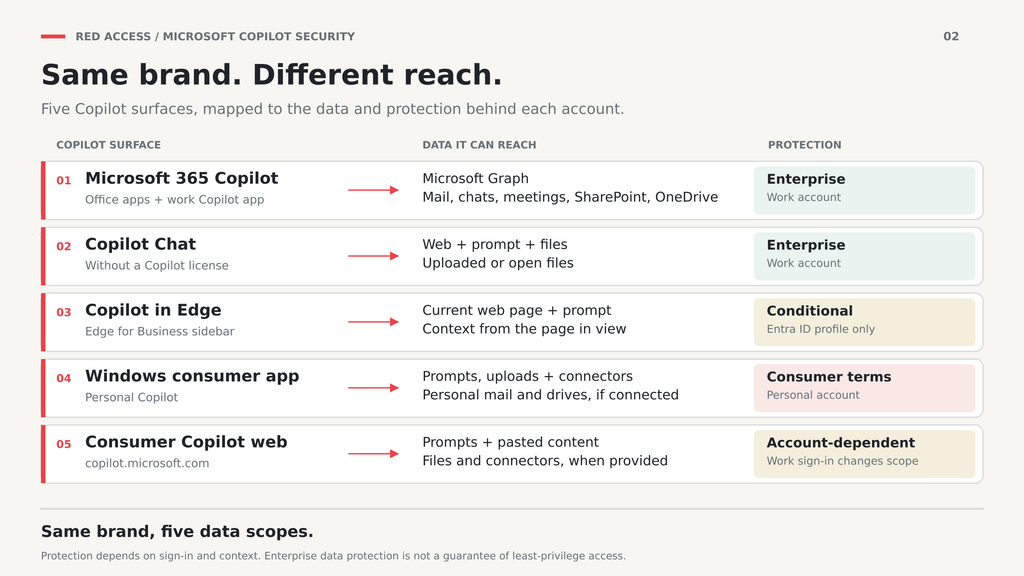
The licensed tenant Copilot is a serious piece of engineering. Per Microsoft’s enterprise data protection page, prompts, responses, and data accessed through Microsoft Graph aren’t used to train foundation models, and Copilot Chat shows a green shield whenever that protection applies, which is whenever the user signs in with a work or school account. Enterprise data protection describes what Microsoft does with your prompts. It doesn’t describe what Copilot can read.
The US House shows how the question moved. In March 2024, the House Chief Administrative Officer declared the commercial Copilot “unauthorized for House use,” citing “the threat of leaking House data to non-House approved cloud services.” On September 17, 2025, Speaker Mike Johnson announced that 6,000 House staffers would get Copilot over the following year. The question changed from whether Copilot is safe to which Copilot, signed into what.
So is Microsoft Copilot safe for work? The tenant version, signed in with Entra ID, is. The risk sits in two places: what that Copilot can already read, and the consumer Copilot one click away. That split is the Microsoft-specific piece of broader GenAI security.
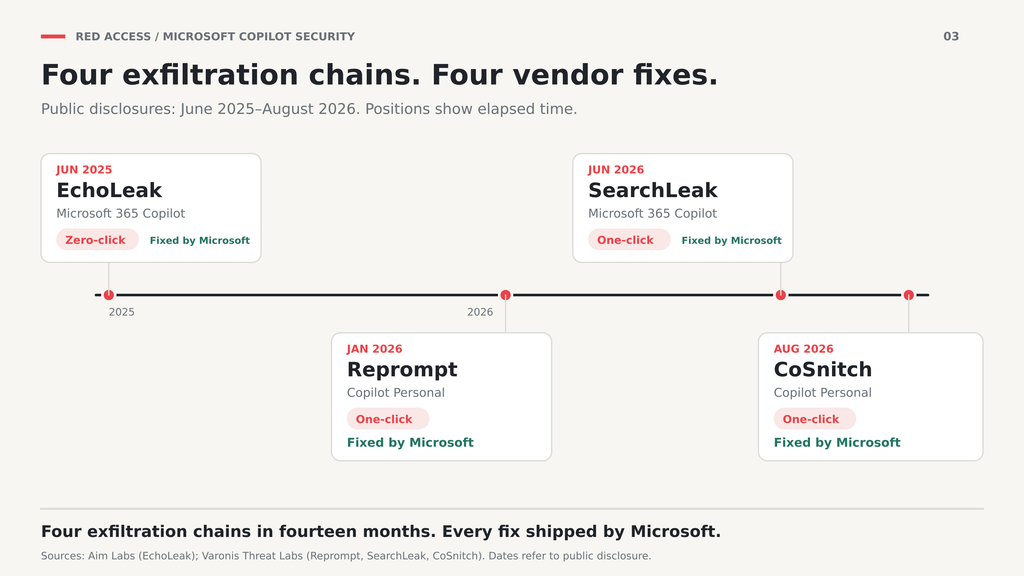
Since June 2025, researchers have disclosed four one-click or zero-click exfiltration chains against Copilot, by the Cloud Security Alliance’s count. EchoLeak came first: Aim Labs showed that one crafted email, which the user never had to open, could make Microsoft 365 Copilot leak tenant data. Microsoft rated it critical, CVSS 9.3 and fixed it server-side. SearchLeak, the tenant-side chain, landed in June 2026. One click on a crafted Copilot Search link, and Varonis Threat Labs pulled email, MFA codes, meeting details, and private files. Both are fixed.
The pattern matters more than any entry. Every chain closed with a vendor patch. None closed with a tenant policy, because no DLP rule, label, or Conditional Access setting can see an instruction hidden inside an email that Copilot was asked to summarize on the user’s behalf. What you control is reach.
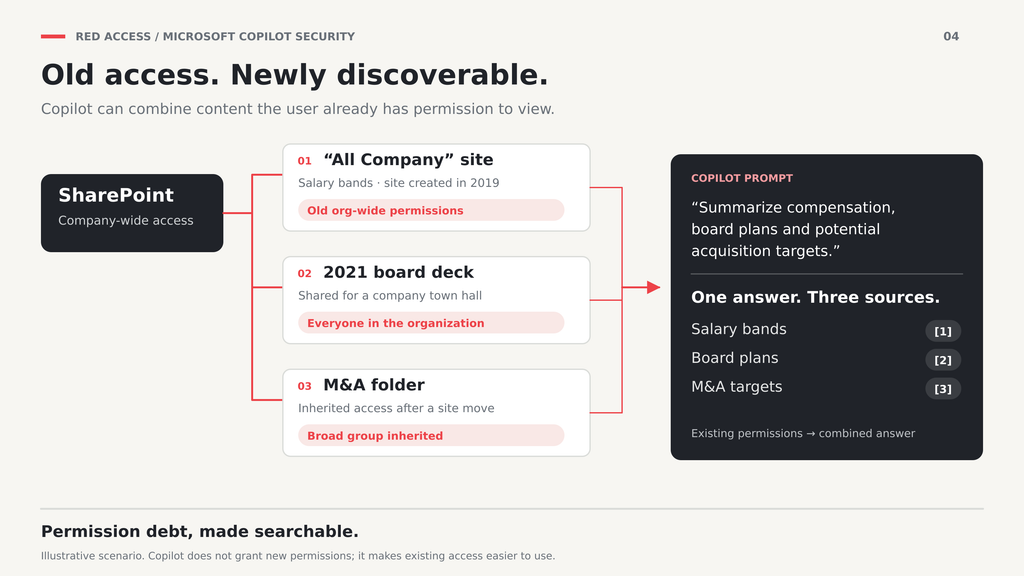
Reach is set by permission debt: access granted years ago, never revoked, now searchable in plain language. Concentric AI’s vendor Data Risk Report 2H 2025, drawn from customer data between January and June 2025, found Copilot accessed “on average almost three million sensitive data records per organization.” It also found 57% of records shared organization-wide contained sensitive data. Before Copilot, finding those records took a search and some curiosity. Now it takes a sentence.
Microsoft states the governing rule in its own words. Copilot “only surfaces organizational data to which individual users have at least view permissions,” and the same page tells admins to use the permission models in SharePoint and other services to give the right people the right access. That’s the honest version of Copilot data governance. It’s an access review with an AI deadline.
Permission debt looks ordinary in an admin center. An “All Company” site from 2019 still holds salary bands. A 2021 board deck was shared with everyone for a town hall. An M&A folder inherited a company-wide group when the deal team moved sites. None of it was secret. It was hard to find. Ask Copilot about compensation bands or acquisition targets, and all three can surface in one answer, with citations.
Microsoft’s controls here are real. A label that applies encryption without the EXTRACT usage right stops Copilot from summarizing that file, and Restricted Content Discovery keeps chosen sites out of Copilot and search unless a user recently interacted with them. So are their limits. Labels govern only what someone labeled, and permission debt tends to sit in old content nobody went back to label. RCD hides a site without changing who can open it. The review still has to happen.
Copilot DLP in Purview works on both sides of the conversation. The Microsoft 365 Copilot and Copilot Chat policy location can stop Copilot from processing files and emails with chosen sensitivity labels. A preview rule, rolling out as of October 2026, refuses prompts that contain sensitive information types in Copilot, Copilot Chat, and Copilot in Word, Excel, and PowerPoint. Another keeps sensitive prompts away from external web search. Licensing varies by plan. Confirm yours first.
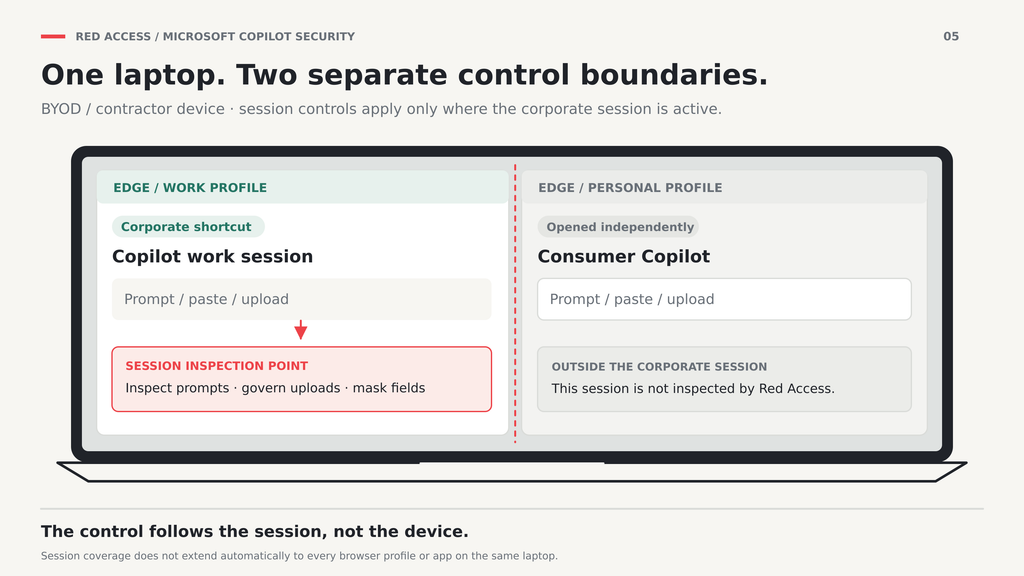
Every one of those rules attaches to the tenant Copilot. Purview governs the tenant. It doesn’t govern the personal Edge profile, the consumer app, or copilot.microsoft.com on a contractor’s laptop. Endpoint DLP narrows the gap on onboarded Windows devices, including paste blocking for Copilot Chat on the web. A separate class of control inspects the prompt where the session renders, whichever Copilot or account sits behind it, which is the model mapped in agentless DLP.
The distinction matters: a URL filter sees that a user opened copilot.microsoft.com; a session-layer control sees what they typed into it before the request leaves the browser.
Prompts aren’t the only exit. A user can upload a file to consumer Copilot, paste a customer list, or download a Copilot answer built from three overshared sites. Those paths fall under broader data loss prevention, where the question is what leaves the session, not which assistant received it.
The goal is rarely zero Copilot. It’s usually the licensed version on and the consumer one off. These controls do that on managed Windows devices, as of October 2026:
Stack all five and the managed Windows fleet is covered. Stop there, and you’ve blocked Copilot only on devices you manage.
On a device Microsoft doesn’t manage, the list above doesn’t exist. AppLocker and the CSP need an enrolled device, Edge policy reaches only a managed Entra ID profile, and enterprise data protection holds only while the user stays signed in with a work account, so nothing stops a contractor opening a personal Edge profile and pasting the 2021 board deck into consumer Copilot. The consumer app redirects Entra sign-ins to the work Copilot. That fixes confusion. It doesn’t fix intent.
That gap is where Red Access works: at the session layer, enforcing policy on the work session rather than on the device. Red Access sees the prompt where the Copilot session renders — in Edge, in the Outlook pane, inside the Copilot buttons in Word, Excel, and PowerPoint, in the Windows consumer app, and on copilot.microsoft.com — regardless of which Copilot or sign-in sits behind it. Prompts to those surfaces are inspected before they leave, uploads are governed, and sensitive fields can be masked. On personal laptops, delivery follows the shortcut model described in enforcing AI policy on BYOD, with nothing installed on the machine.
Applied to Red Access, the coverage test used on every control above draws real edges. A session-layer control doesn’t fix SharePoint permissions, doesn’t patch the next EchoLeak, and doesn’t replace sensitivity labels. If a contractor opens consumer Copilot in a browser session outside the corporate shortcut, that session isn’t inspected. Governing Copilot is a permissions project first and a coverage project second. Run the access review, put Purview DLP on the tenant Copilot, block the consumer app where you manage the device, and govern the session where you don’t.
If you’re deciding which Copilots your unmanaged devices can reach, see how Red Access governs the Copilot session →
Does Microsoft Copilot train on our company data?
Not the tenant version. Under enterprise data protection, Microsoft states that prompts, responses, and data accessed through Microsoft Graph aren’t used to train foundation models. That commitment depends on a work or school sign-in. A personal Microsoft account in consumer Copilot falls under consumer terms and settings instead. The sign-in matters as much as the product name.
Is Copilot Chat free, and is it safe for work data?
Copilot Chat is available at no extra cost to users who sign in with a work or school account and hold a qualifying Microsoft 365 subscription. Signed in with a work account, it carries enterprise data protection, shown by a green shield next to the New Chat button. Without a Copilot license it grounds on the web and on what users give it, not on Graph. The risk is the user who pastes work data into it while signed in personally.
Can we allow Microsoft 365 Copilot but block consumer Copilot?
On managed Windows devices, yes. Assign Copilot licenses to the groups that need them, block package Microsoft.Copilot with AppLocker, and set the Edge toolbar policy for Entra ID profiles. Consumer Copilot on the web, and any device outside Intune, needs a control that sits in the session or the network path, since none of the Windows policies reach it.
Do sensitivity labels stop Copilot from summarizing a file?
A label by itself doesn’t. A label that applies encryption without granting the user the EXTRACT usage right does: Copilot can link to that file but won’t summarize it. A Purview DLP rule can also exclude files with chosen labels from Copilot processing. Neither helps with content nobody labeled, which is often where overshared files sit.
Should we delay Copilot until permissions are cleaned up?
Not necessarily. Restricted Content Discovery can hide your highest-risk SharePoint sites from Copilot and search while the access review runs, and sensitivity labels can lock down the files you already know about. Treat both as a holding pattern. RCD doesn’t change who can open a site, so the review still decides what Copilot eventually exposes.
Does Security Copilot have the same risks?
It’s a different product. Security Copilot is Microsoft’s AI assistant for SOC teams, working over signals from Defender, Sentinel, Entra, Intune, and Purview. It runs on its own security compute units, which Microsoft now includes for eligible Microsoft 365 E5 and E7 customers. Prompt injection is a risk class shared across AI assistants. The permission-debt exposure described here belongs to the Copilot that reads your mail, chats, and files.
Insights & Ideas

|
AI agent security governs what agents can access, connect to, and do. Map agentic AI risks, MCP…

|
ChatGPT Enterprise keeps workspace data out of training. The risk is the personal account one tab away.…
|
Microsoft Copilot security is a permissions problem first. Map every Copilot surface, set Purview DLP, block what…