By Red Access · 4 min read
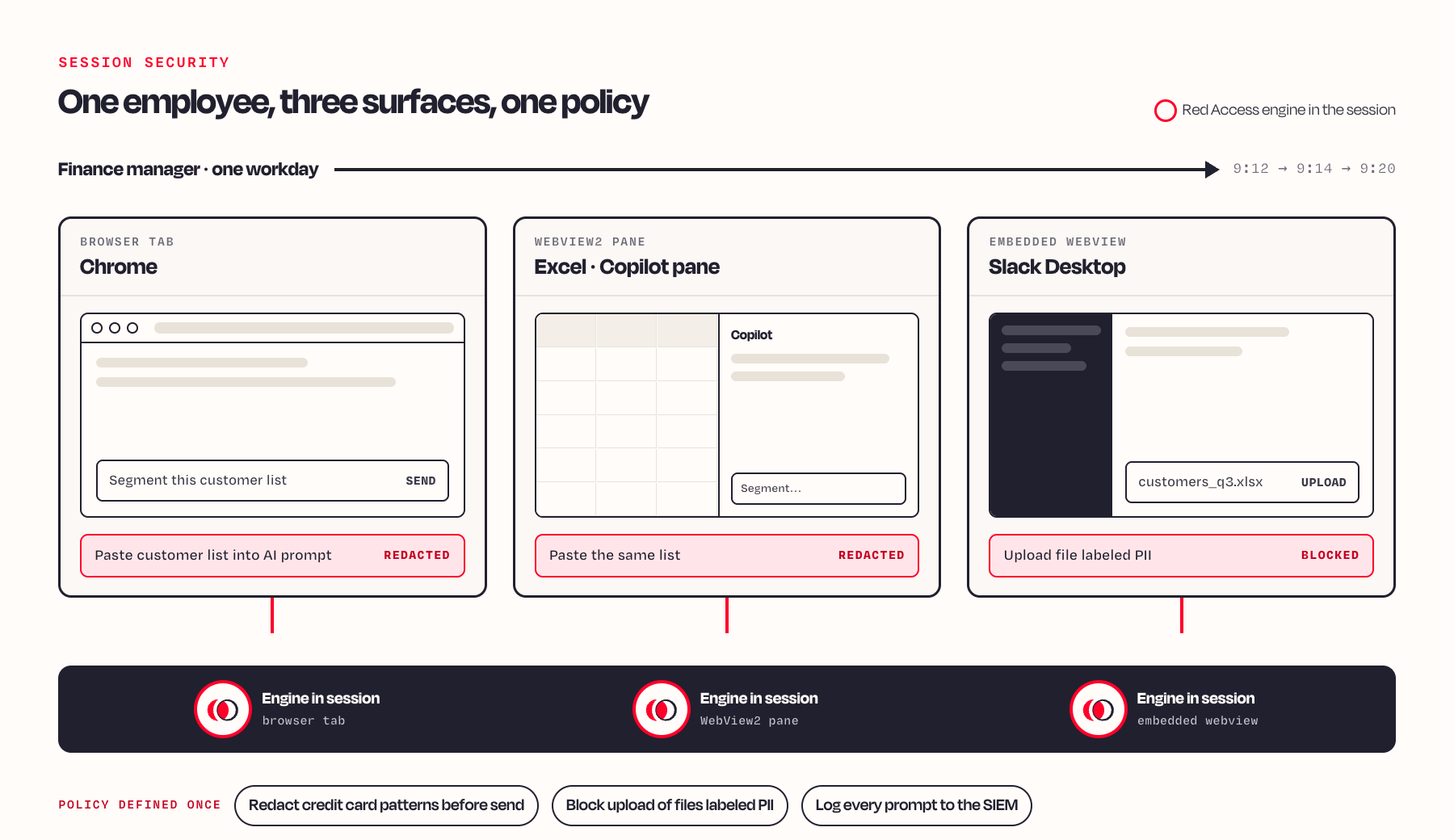
A finance manager opens ChatGPT in Chrome and pastes a customer list into the prompt. The company’s DLP catches it, redacts the account numbers, and logs the attempt. Ninety seconds later, the same manager opens Excel on the desktop, clicks the Copilot pane, and pastes the same list to ask for a segmentation. Nothing fires. No redaction. No log entry. Same data, same person, same risk — but the enforcement surface changed.
Key takeaways
- Microsoft’s own enterprise documentation states, in current wording, that Microsoft Edge browser policies don’t apply to WebView2 — the engine behind the Copilot pane inside desktop Excel, Word, and Outlook.
- That means every browser-based DLP control stops the moment a user clicks into a Copilot pane. By design, not by misconfiguration.
- The session is the only layer that governs both surfaces. Red Access delivers its in-flight engine into the WebView2 pane with the same fidelity as into a browser tab — no browser replacement, no extension rollout, no additional endpoint agent.
This isn’t a misconfiguration. Microsoft documents it.
What happened at 9:14 a.m.
The two surfaces look identical to the user. The Copilot pane inside desktop Excel renders in a side panel that behaves like a browser tab — the prompt is typed in a familiar box, the model’s response streams in, and files can be attached. The visual is the same. The enforcement surface is not.
Browser-based DLP, whether delivered through a managed browser, an extension, or a cloud proxy, enforces at the browser boundary. When the user moves from a Chrome tab to the Copilot pane inside Excel, they haven’t launched a new browser — they’ve launched an embedded one, inside an application their endpoint policy already trusts. The CASB sees Office. The EDR sees excel.exe. Neither sees inside a live Copilot session where the sensitive data is actually being pasted.
The Copilot DLP gap is designed in, not accidental
In its September 11, 2026 enterprise guidance for WebView2, Microsoft states it plainly:
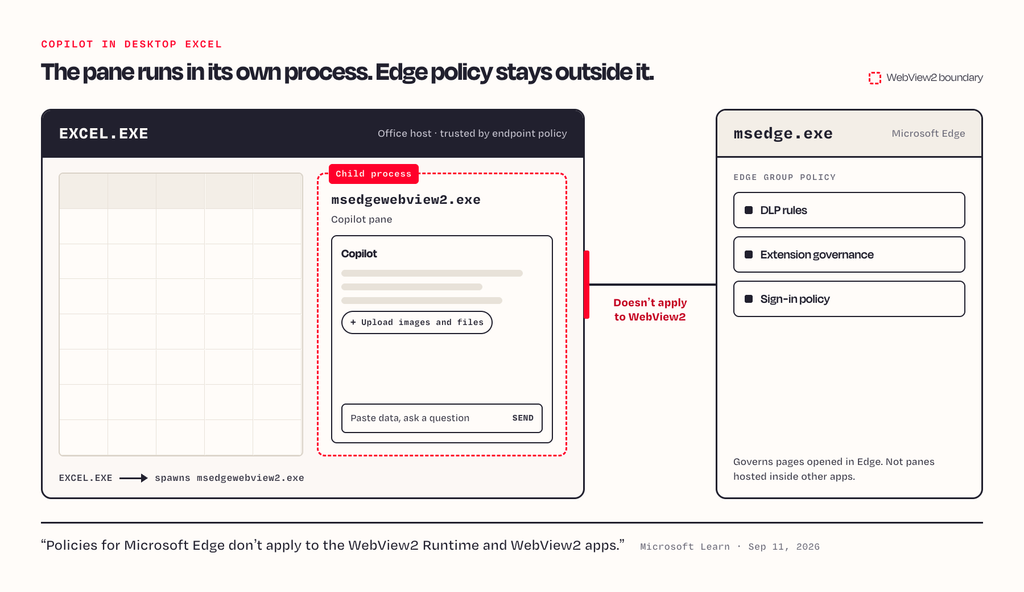
“Browser policies are separate from WebView2 policies. Policies for Microsoft Edge don’t apply to the WebView2 Runtime and WebView2 apps.”
The Copilot pane inside desktop Excel, Word, and Outlook renders through WebView2 — the msedgewebview2.exe process that spawns inside the Office host, not inside Edge. The user experience looks identical to a browser tab. The policy surface it answers to is not the same.
The pane isn’t incidental. It’s where the prompt is typed, where the file is attached, and where the model’s response lands before anything is written into the underlying document. A November 2026 WebView2 regression made the architecture visible in an unflattering way: when the task pane fell below WebView2’s 400-pixel occlusion threshold, the “Upload images and files” button inside the Excel Copilot pane broke outright. The upload lived inside WebView2 the whole time. The Office host didn’t see it.
Why the gap keeps widening
The gap isn’t a bug Microsoft needs to fix. WebView2 was architected as an embeddable engine so any application could host web content on its own terms. That’s useful. It also means the policy that governed the browser doesn’t travel with the content.
Every Office app, every Teams channel, every embedded AI pane is its own enforcement surface — and the surface keeps expanding. The Copilot pane in Excel and Word. Agent Mode in Excel. Researcher inside Microsoft Copilot. Designer in PowerPoint. The Outlook summary pane. Teams. Each is a WebView2 session the user treats as part of the application. The same is true, by the same mechanism, for the embedded webviews inside ChatGPT Desktop, Claude Desktop, Slack Desktop, and the growing set of productivity apps that ship a Chromium-based renderer bundled with the app.
For most enterprises, the stack isn’t ready for this. The controls that govern Edge and Chrome at the browser boundary don’t follow the user past the edge of the browser’s own window. For the pane embedded inside Office, Microsoft’s own documentation is the cleanest acknowledgment that two surfaces are being governed separately — by design.
Where the enforcement layer has to move
Red Access is session security: an in-flight engine that governs the session itself, not the browser around it. When a user opens any session — a tab in Chrome, a WebView2 pane inside Excel, an embedded webview inside Slack Desktop, ChatGPT Desktop — the Red Access engine is delivered into that session’s memory before the page renders. From there it governs the actions that matter: prompt submission, file upload, clipboard, download, and the specific data being moved. The same policy that redacts a customer list in the browser also redacts it when the user pastes it into the Excel Copilot pane. No browser replacement. No extension rollout. No additional endpoint agent.
The practical difference is narrow and specific. A policy defined once — block upload of files labeled PII, redact credit card patterns before send, log every prompt to the SIEM — fires inside the WebView2 pane with the same fidelity it fires inside a browser tab, because the engine lives in the session, not the chrome around it.
The browser was never the asset. The session is. Microsoft’s own documentation is the clearest statement we have that the policy has to follow the work.
FAQ
Does Microsoft Edge group policy apply to the Copilot pane in Excel?
No. Microsoft’s current enterprise documentation for WebView2 states that Microsoft Edge browser policies don’t apply to the WebView2 Runtime or WebView2 applications. The Copilot pane in desktop Excel, Word, and Outlook renders through WebView2. Any DLP, extension governance, or sign-in policy applied at the Edge level does not carry into the pane.
What exactly is WebView2, and why does Copilot use it?
WebView2 is Microsoft’s embeddable browser runtime based on Chromium. It allows any application to host web content inside its own window without launching a separate browser. The Copilot pane needs it because the pane is, functionally, a web experience — prompts, streaming responses, file uploads — that Office hosts inside the application’s native window. From a user experience standpoint, it’s seamless. From a policy standpoint, it’s a different enforcement surface.
Can an enterprise browser or a browser extension govern what happens in a Copilot pane?
Not by itself. Enterprise browsers enforce policy inside their own browser window. When the user clicks into the Copilot pane inside Excel, they’re outside that window. Browser extensions have the same scope limit — they govern pages opened inside the browser they’re installed in, not WebView2 sessions embedded inside other applications.
Does Red Access require an agent on every machine to govern the Copilot pane?
No. Red Access delivers its security engine into each session as the session opens, across browsers and embedded webviews alike. There’s no endpoint agent, no extension rollout, and no browser swap — one configuration applies the same policy to a Chrome tab, an Edge tab, and a WebView2 Copilot pane inside desktop Excel.
See what crosses the boundary — and what Red Access catches on the other side. Request your free Red Access Insight Report →
Sources
Microsoft Learn. (2026, September 11). Enterprise management of WebView2. https://learn.microsoft.com/en-us/deployedge/webview2-enterprise#browser-policies-vs-webview2-policies
MicrosoftEdge. (2026, November). WebView2Feedback — Issue #5797: FileChooserMinWindowSize regression. GitHub. https://github.com/MicrosoftEdge/WebView2Feedback
Shindler, D. (2026, March 16). The firewall isn’t blind — it just needs to see inside the session. The Hacker News. https://thehackernews.com/expert-insights/2026/03/the-firewall-isnt-blind-it-just-needs.html
Red Access. (2026, April 1). Block the prompt, not the work: The end of “Doctor No.” The Hacker News. https://thehackernews.com/2026/04/block-prompt-not-work-end-of-doctor-no.html