In May 2024, an intruder pulled roughly 1.1 terabytes out of thousands of Disney’s internal Slack channels. Not through a Slack flaw. Not through a misconfigured setting. Through one employee’s working credentials, taken from a personal computer. That pattern runs through most of the public record on Slack security.
Key takeaways about Slack security
- The public Slack breach record, from EA in 2021 to Nikkei in 2025, runs on authenticated sessions. Where details are public, intruders signed in with stolen credentials or cookies, then moved data the way any member could.
- Slack DLP is a real control on Enterprise plans. Slack’s own documentation lists what it skips: images, file names, Slack lists, files over 100 MB, externally hosted files, and AI summaries.
- Self-serve exports, Slack Connect channels, and third-party app scopes are sanctioned features. Each one moves workspace data to places your message-level rules never follow.
- Session-level controls govern download, copy, paste, and upload where the session runs, including the Electron desktop client. They don’t see data at rest on Slack’s servers or API calls made from elsewhere.
Slack Security Risks Security Teams Underestimate
Slack security refers to the controls that govern a workspace once someone is inside it: not only who can sign in, not only what Slack stores, but what an authenticated member, guest, or app does with messages and files during a live session. Slack belongs in your broader SaaS app security program. It also needs its own map.
The public record is consistent. In 2021, the group behind the EA breach told Motherboard it bought stolen cookies for $10, used them to enter an EA Slack channel, then requested a multifactor authentication token from EA IT support. It claimed 780 GB. In September 2022, Uber’s intruder posted to a company-wide Slack channel and downloaded internal Slack messages. That same month, the teenager behind the Rockstar Games leak broke into the company’s internal Slack messaging system. In November 2025, Nikkei disclosed an unauthorized Slack login that exposed names, email addresses, and chat histories for 17,368 people.
None of these began with a flaw in Slack’s code. Each began with a working identity. In the Disney and Nikkei cases, by prosecutors’ and the company’s own accounts, the credentials came off a personal computer through malware that harvests saved logins, and Uber’s filing says the same was likely true of its contractor. Call it the authenticated exit: data leaving through a session Slack has every reason to trust. Teams carries a different profile, built around live social engineering, covered in our Microsoft Teams security guide.
Slack Data Exfiltration: How Data Leaves the Workspace
Slack data exfiltration rarely needs an exploit. Take a sales lead with two weeks left before joining a competitor, signed in to the desktop client with access to every customer channel, and list the routes open to them on an ordinary afternoon beside the native control Slack offers for each.
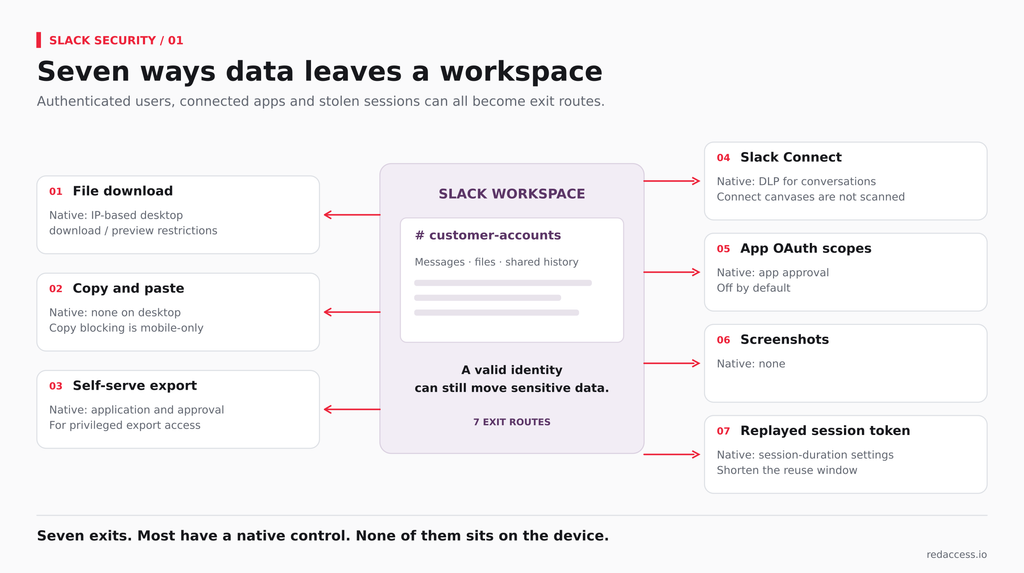
- File download. Any member can save a shared file to local disk. Native control: Slack can block desktop downloads and previews outside allowed IP ranges. It’s a location rule, applied to every file alike.
- Copy and paste from the desktop client. A customer list in a channel can be pasted into personal email or an AI tool in seconds. Native control: none on desktop. Slack’s copy block applies to mobile only.
- Self-serve export. Business+ Workspace Owners can apply for an export that includes private channels and DMs. Enterprise Org Owners can request every conversation for a single user. Native control: Slack’s application and approval step.
- Slack Connect. Shared channels put messages and files in front of another company’s members, on devices their admins manage. Native control: DLP rules can cover Slack Connect conversations, though canvases there aren’t scanned.
- Third-party app OAuth scopes. An installed app with history-reading scopes pulls messages through the API from wherever it runs. Native control: app approval, which is off by default.
- Screenshots. A screen capture turns a pricing thread into an image. Native control: none.
- A replayed session token. A stolen cookie or token resumes a session without the password: the EA route, and the one Slack itself disclosed in December 2022, when “a limited number of Slack employee tokens were stolen and misused” to reach its GitHub repositories. Native control: session duration settings shorten the window. Mechanics are in our guide to how attackers bypass MFA.
Most of these routes have a native control, and each one sits on Slack’s servers after content is posted, at an approval step, or at a network boundary, never on the device where the member reads, copies, and saves. That stretch is the authenticated exit. Slack’s admin console can’t draw it.
Slack DLP: Native Options vs. Session-Level Controls
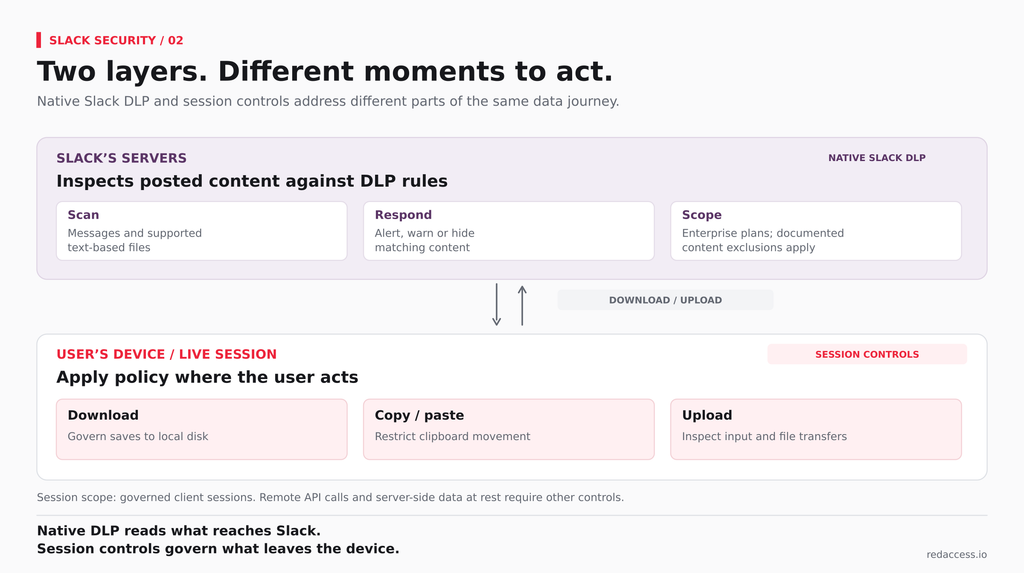
Slack DLP deserves an honest hearing. DLP Admins write custom rules in PCRE regex or choose preconfigured ones for card numbers, national IDs, and API secrets, and a match can raise a dashboard alert, warn the sender, or hide the message or file until review, which Slack calls tombstoning. Rules can extend to Slack Connect conversations. Enterprise+ customers can add EKM as a paid add-on to hold their own encryption keys. Useful controls, every one.
Slack’s own DLP documentation is just as direct about the limits. DLP doesn’t scan images, video, or audio, file names, AI summaries, canvases in Slack Connect, Slack lists, search results, files over 100 MB, or files hosted externally. Alerts expire after 90 days, and the feature is available on Enterprise plans only. None of that is a vendor’s critique. It’s Slack’s documentation, and it matters to any data loss prevention program that treats Slack as covered.
So the useful question isn’t whose regex is sharper. It’s where each control sits. Native Slack DLP inspects content after it reaches Slack’s servers. Session-level controls act inside the live session on the device: the download, the paste, the upload, before data leaves. Our breakdown of agentless DLP architectures shows why the two layers complement each other.
| What’s scanned or controlled | Native Slack DLP (Enterprise plans) | Session-level control | Neither |
| Text in messages and text-based files | Scanned against rules | Inspected at input and upload | |
| Images, video, audio | Not scanned | Upload and download governed by policy | |
| Copy and paste out of the desktop client | Not covered | Governed | |
| Download to local disk | Tombstone only, if a rule fired first | Governed per action when downloaded through the Slack client session | |
| Download of a self-serve export ZIP | Not covered | Governed per action when the export is downloaded through the Slack client session | |
| Screenshots of a channel | Not covered | Screen-capture controls, where supported | |
| Canvases in Slack Connect | Not scanned | Copy and download governed in your users’ sessions | |
| Bot and app tokens calling the API from elsewhere | Not covered | Not covered | App approval, SSPM or CASB-API tools |
| Historical data at rest on Slack’s servers | Not covered | Not covered | eDiscovery, retention, API-based scanners |
Slack File Sharing Security
Slack file sharing security hinges on three lines in Slack’s documentation. DLP reads text-based files. It skips anything over 100 MB. It sees only the link for files hosted in third-party storage apps. A design spec exported as a PNG, a recorded product demo, and a 300 MB customer dataset all move through Slack without a rule firing, and because file names aren’t scanned, a file called “FINAL_pricing_confidential” tells DLP nothing.
Now put those files in a Slack Connect channel with your creative agency. The agency’s people sit in their own Slack org, under their own admins, on laptops you’ve never inventoried. Your DLP rule can watch the conversation. It can’t follow the download onto their hardware. A contractor in a DM on a personal laptop is the same exposure with fewer steps.
Slack AI adds one more surface. In August 2024, PromptArmor showed an indirect prompt injection in which instructions planted in a public channel could steer Slack AI to render a link that, once a user clicked it, carried a private-channel secret to an outside server. Slack’s first response described the public-channel visibility behind it as “intended behavior,” then deployed a patch on August 20, 2024 and reported no evidence of unauthorized access to customer data. Read it as a phishing path built from your own workspace content, not as open access to private channels.
Slack Desktop App Security: Why Browser-Only Tools Miss It
Plenty of Slack use never touches a browser tab. The desktop client is built on Electron, as Slack’s own engineering team has written, a framework that packages a Chromium renderer and Node.js as a native program. To an enterprise browser or a browser extension, whose policy stops at the edge of the browser it manages, that window doesn’t exist. Browser-only tools see the tab. They don’t see the app.
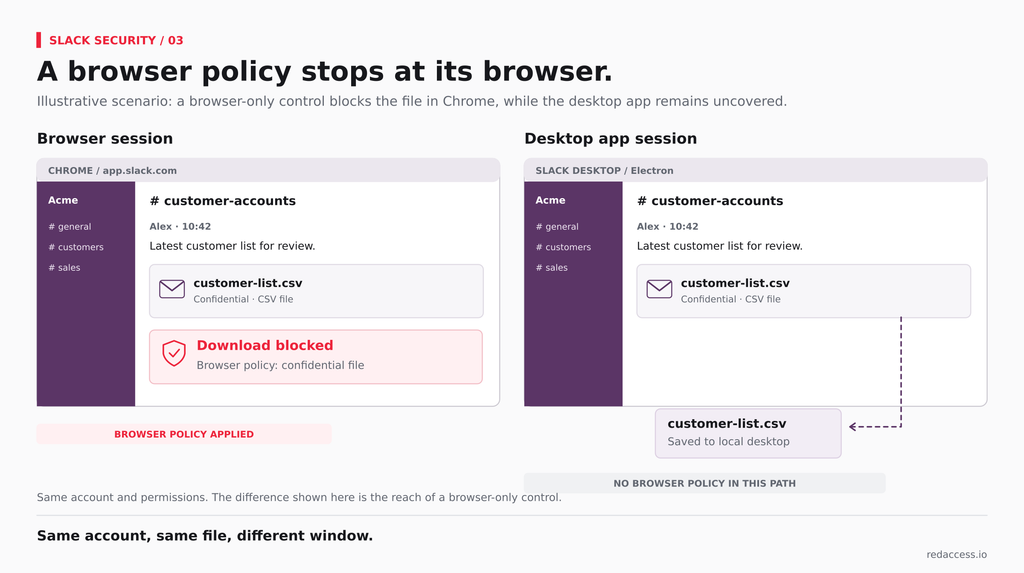
That’s the desktop coverage gap, and in Slack it’s concrete. The departing sales lead who’s blocked from downloading a customer list in Chrome opens the desktop app and drags the same file out. Same account, same data, different window, no policy in the path. Slack desktop app security has to sit where the session runs, whichever window hosts it.
Red Access applies session-layer policy to web-based desktop apps, Slack’s client included, alongside the major browsers, with no browser replacement, no extension rollout, and no additional endpoint agent. Inside a live Slack session it governs download, upload, copy, and paste. It doesn’t see Slack’s server-side data at rest, exports pulled through the API, or bot and app tokens calling Slack from someone else’s infrastructure. Those stay with Slack’s native DLP, eDiscovery, and SSPM or CASB-API tools. Hold any vendor claiming Slack coverage, Red Access included, to that same test.
Securing Slack for Contractors and BYOD
Contractors are where the authenticated exit runs widest. Disney’s breach began on a personal computer, with a fake AI art tool and a stored set of work credentials, according to the Justice Department. Uber’s own filing describes a similar starting point: a contractor’s personal device, likely infected with malware. Neither company could have put an agent on those machines. Neither machine was theirs.
Slack’s native levers for contractors mostly govern access: guest accounts limited to specific channels, Slack Connect to keep an agency inside its own org, session duration settings that force re-authentication, and an IP allowlist that blocks desktop downloads outside the office network. Each decides who reaches the data, or from where. None governs what a personal laptop does with a file once it’s open.
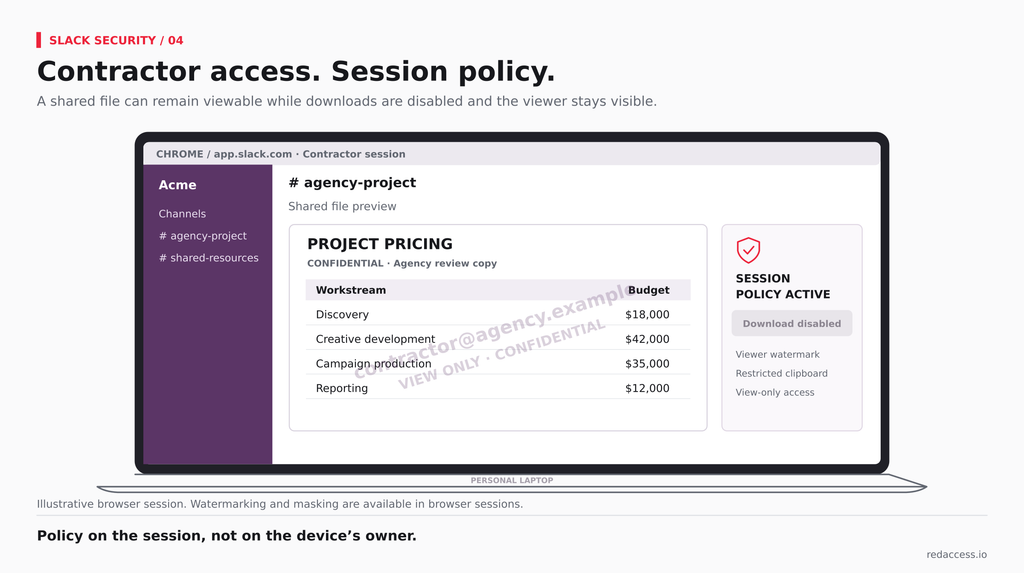
For contractor and personal devices, Red Access applies the same session policy as configuration, not deployment, with no browser replacement, no extension rollout, and no additional endpoint agent: block downloads and restrict clipboard use, with watermarking and masking available in browser sessions.. That’s the model behind secure BYOD and contractor access. Data an agency’s own Slack org already holds, or that an app pulls through the API, still sits outside the session.
FAQs
Is Slack secure enough for confidential data? Slack encrypts data in transit and at rest, and Enterprise+ customers can add EKM to hold their own keys. The platform is rarely the weak point in the public record. The weak point is what authenticated people and apps can move out, so the answer depends on the controls you place around sessions, exports, and connected apps.
Which Slack plan includes DLP? Native DLP is available on Slack’s Enterprise plans, listed on the pricing page as Enterprise+, and requires the DLP Admin system role. Free, Pro, and Business+ don’t include it. EKM is a separate paid add-on. Packaging changes, so confirm it on Slack’s pricing page before you buy.
Can Slack admins read private messages and DMs? Not in day-to-day use. Exports are the exception, and Slack gates the full ones behind an application framed around legal and regulatory compliance. Members holding the Export Admin system role can run exports too, so put owner and export roles on the same access review as your other privileged admin accounts.
Does Slack AI use our data for training? Slack states that customer data is never used to train large language models and stays on Slack-controlled infrastructure. The open question is retrieval. Slack AI answers from content the asking user can reach, and DLP doesn’t scan AI summaries, so review which channels hold sensitive material before enabling it widely.
How do I stop contractors downloading files from Slack? Layer it. If contractors work from known networks, turn on Slack’s desktop download block with an IP allowlist. Where they don’t, apply download and clipboard policy in the session on their device, and watermark what they can view, so a file opened on a personal laptop stays traceable.
The question worth asking isn’t whether Slack DLP works. It does, for the content it scans. It’s whether the authenticated exit in your workspace runs through content it scans at all.
If you’re mapping where Slack data leaves your workspace, see how Red Access governs the session where it happens →
Sources
Cox, J. (2021, June 11). How hackers used Slack to break into EA Games. VICE. https://www.vice.com/en/article/how-ea-games-was-hacked-slack/
Nikkei Inc. (2025, November 4). Unauthorized access and information leak on the “Slack” business chat platform. https://www.nikkei.co.jp/nikkeiinfo/en/news/announcements/1394.html
PromptArmor. (2024, August 20). Data exfiltration from Slack AI via indirect prompt injection. https://www.promptarmor.com/resources/data-exfiltration-from-slack-ai-via-indirect-prompt-injection
Slack. (n.d.-a). Block file downloads and message copying in Slack. Slack Help Center. Retrieved October 8, 2026, from https://slack.com/help/articles/360016181794-Block-file-downloads-and-message-copying-in-Slack
Slack. (n.d.-b). Export your workspace data. Slack Help Center. Retrieved October 8, 2026, from https://slack.com/help/articles/201658943-Export-your-workspace-data
Slack. (n.d.-c). Manage app approval for your workspace. Slack Help Center. Retrieved October 8, 2026, from https://slack.com/help/articles/222386767-Manage-app-approval-for-your-workspace
Slack. (n.d.-d). Pricing. Retrieved October 8, 2026, from https://slack.com/pricing
Slack. (n.d.-e). Security for AI features in Slack. Slack Help Center. Retrieved October 8, 2026, from https://slack.com/help/articles/28310650165907-Security-for-AI-features-in-Slack
Slack. (n.d.-f). Slack data loss prevention. Slack Help Center. Retrieved October 8, 2026, from https://slack.com/help/articles/12914005852819-Slack-data-loss-prevention
Slack. (n.d.-g). Slack Enterprise Key Management. Slack Help Center. Retrieved October 8, 2026, from https://slack.com/help/articles/360019110974-Slack-Enterprise-Key-Management
Slack. (n.d.-h). Slack security. Slack Trust Center. Retrieved October 8, 2026, from https://slack.com/trust/security
Slack. (2022, December 31). Slack security update (updated January 9, 2023). https://slack.com/blog/news/slack-security-update
Slack. (2024, August 21). Slack security update. https://slack.com/blog/news/slack-security-update-082124
Slack Engineering. (n.d.). Electron [Tag archive]. Retrieved October 8, 2026, from https://slack.engineering/tags/electron/
Tidy, J. (2023, December 21). Lapsus$: GTA 6 hacker handed indefinite hospital order. BBC News. https://www.bbc.com/news/technology-67663128
Uber Technologies, Inc. (2022, September 19). Company update (Exhibit 99.1, Form 8-K). U.S. Securities and Exchange Commission. https://www.sec.gov/Archives/edgar/data/1543151/000155278122000558/e22427_ex99-1.htm
U.S. Attorney’s Office, Central District of California. (2025, May 1). Santa Clarita man agrees to plead guilty to hacking Disney employee’s computer, downloading confidential data from company. U.S. Department of Justice. https://www.justice.gov/usao-cdca/pr/s