Reviews of AI coding assistant security often start and end with one question: does the vendor train on our code? Cursor, Claude Code, and GitHub Copilot do far more than receive code. They read whole repositories, run shell commands, and install extensions, on laptops where the developer is often a local admin.
Key takeaways
- The plan tier settles training. It doesn’t settle leakage. Enterprise terms from Cursor, Anthropic, and GitHub govern what the vendor keeps, and agent reach governs what can leave the developer’s machine.
- Ignore files bind the editor more reliably than the agent. Cursor’s own documentation says its agent’s terminal and MCP tools “cannot block access” to code governed by .cursorignore.
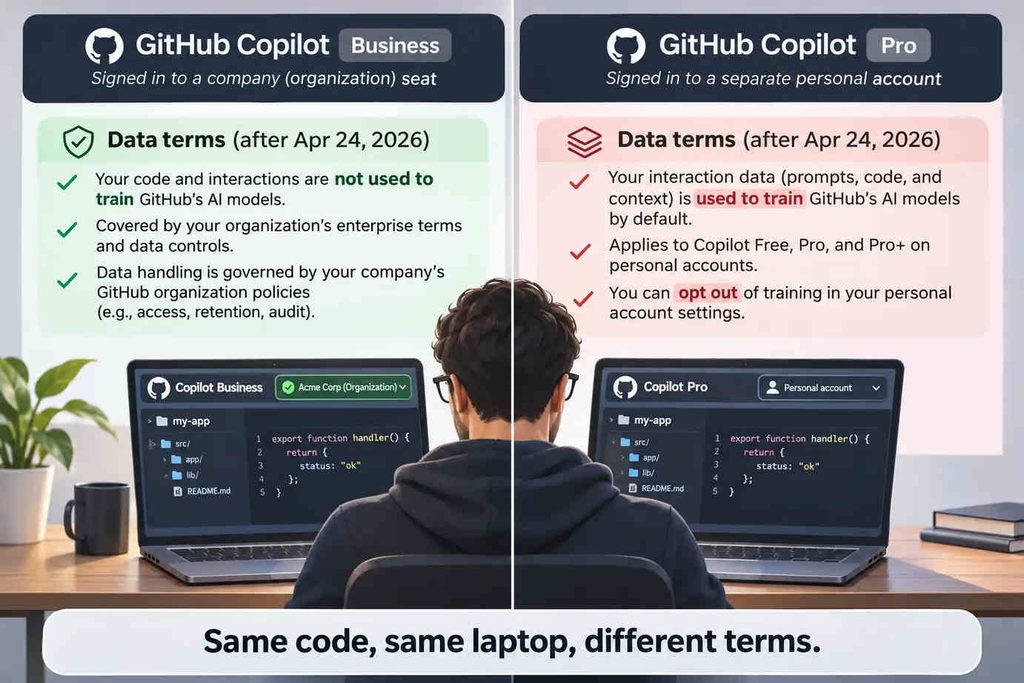
- Since April 24, 2026, GitHub trains on interaction data from Copilot Free, Pro, and Pro+ unless the user opts out. The exposure sits with personal accounts outside any paid GitHub organization.
- Claude Code’s sandbox is off by default, and once on, it still lets commands read most of the machine, ~/.ssh included. Credential paths need explicit read denies in managed settings.
AI coding assistant security refers to the controls that operate where the coding agent actually works: not the vendor’s training policy, not the code review after a pull request, but the developer workstation, where the agent reads files, runs commands, loads extensions, and authenticates with whatever account the developer signed in with. Call that envelope agent reach: everything a tool can read, run, and reach from one machine. Training terms are one input to it. They aren’t the boundary.
This is the developer-workstation branch of GenAI security, and it runs on different mechanics: a shell, a file system, and an extension registry instead of a chat box.
Why AI Coding Tools Need Their Own Security Model
A chat assistant sees what someone pastes into it. A coding assistant sees the repository. Cursor indexes the codebase, Claude Code walks the file tree of whatever directory it was launched from, and Copilot pulls context from the open file and neighboring tabs. Then the agent acts: it edits files, runs builds, installs packages, calls MCP servers, and commits, all as the developer, with the developer’s GitHub token, cloud CLI session, and SSH keys within reach.
That turns a data-handling problem into an execution problem. A prompt-inspection rule can’t see cat ~/.aws/credentials in a terminal, or an extension update that lands overnight. Most of these tools also run outside the browser, as Electron editors and terminal processes, which is the wider case for securing AI beyond the browser.
Unsanctioned builders are a separate story, already told in how vibe coding rewrote shadow AI. This guide stays with the tools you’ve approved, because approval is often where the review ends. The form asks about training. Usually nothing else.
AI Coding Tools Source Code Leakage: How It Happens
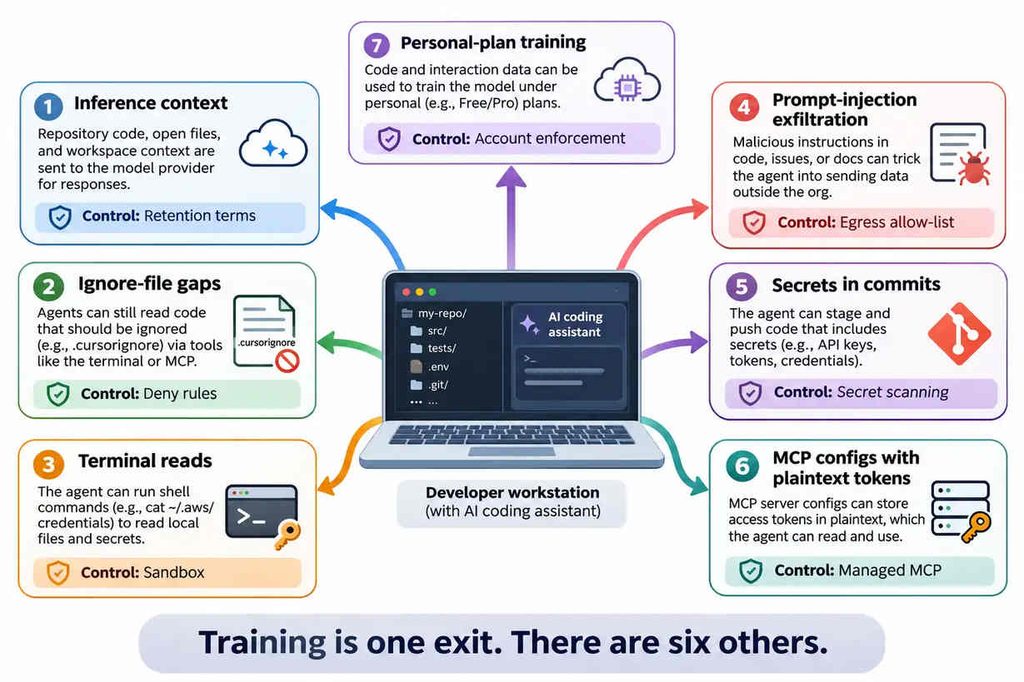
Seven paths cover most of the ways code and secrets leave through a sanctioned tool. Training is one of them. Each path widens or narrows agent reach, and each has a tool-level control, if someone sets it.
- Inference context. Every request ships code to a model provider. Control: retention terms, meaning Cursor’s Privacy Mode, Claude Code’s commercial terms, or a Copilot Business seat.
- Ignore-file gaps. .cursorignore and Copilot content exclusion shape what the editor indexes. Neither reliably binds an agent with a terminal. Control: agent-level deny rules and sandboxing.
- Terminal reads. An agent that can run cat or kubectl config view reads whatever the developer can. Control: permission rules plus read denies on credential paths.
- Prompt-injection exfiltration. A hidden instruction in a pull request, issue, or rules file steers the agent into sending data out. Control: a short egress allow-list and no rendering of untrusted content.
- Secrets in commits. GitGuardian’s State of Secrets Sprawl 2026 found Claude Code co-authored commits leaked a secret 3.2% of the time, against a 1.5% public GitHub baseline. Control: push-time secret scanning.
- MCP configs with plaintext tokens. The same report counted 24,008 unique secrets in MCP-related config files, 2,117 of them valid. Control: environment references and a managed server allowlist.
- Personal-plan training. A developer on a consumer plan carries consumer terms into company code. Control: account enforcement at sign-in.
Paths 1 and 7 concern where data goes and under whose account, the territory network and session controls were built for; paths 2 through 6 happen on disk, in a shell, and in git, where the tool’s own settings carry the weight. That split is the same question behind any agentless DLP evaluation.
Cursor Security: Privacy Mode, Rules and Extensions
Data terms. Privacy Mode is a real control, and the right one to start with. With it on, Cursor says it holds zero data retention agreements with its model providers and doesn’t train on customer data. With it off, Cursor’s data-use page says it “may use and store codebase data, prompts, editor actions, code snippets, and other code data and actions to improve our AI features and train our models.” Teams get Privacy Mode on by default, and admins can lock it on. A personal API key doesn’t change the route: requests “will still go through our backend.”
Risky default. Cursor’s ignore-file documentation is candid: “The terminal and MCP server tools used by Agent cannot block access to code governed by .cursorignore.” Picture a monorepo with a .env at the root. .env* sits on Cursor’s default ignore list, so the editor won’t index it. The agent’s terminal can still cat it. The second default is Workspace Trust, which Cursor’s own agent security page lists as disabled by default.
On the record. In September 2025, Oasis Security showed what that allows: a .vscode/tasks.json set to run on folder open executes the moment a developer opens a cloned repo. No prompt. A month earlier, Aim Labs’ CurXecute used a prompt injection delivered through a Slack MCP server to rewrite ~/.cursor/mcp.json and run commands, and Check Point Research’s MCPoison swapped the command behind an already-approved MCP entry. Cursor fixed both in its 1.3 releases.
What to set. Enforce Privacy Mode at the team level. Turn on security.workspace.trust.enabled, set task.allowAutomaticTasks to off, treat .cursorignore as an indexing hint, and keep live secrets out of the working tree entirely. Review .cursor/rules and mcp.json in pull requests like code.
Claude Code Security: Permissions, Terminal Access and MCP
Data terms. Anthropic’s data-usage terms split by account type. Under commercial terms (Team, Enterprise, and the API), Anthropic says it doesn’t train generative models on code or prompts sent to Claude Code, keeps data 30 days as standard, and offers zero data retention on Claude for Enterprise after an eligibility check. Consumer plans (Free, Pro, and Max) changed with the terms update Anthropic announced in August 2025: five years of retention with the model-improvement setting on, 30 days with it off.
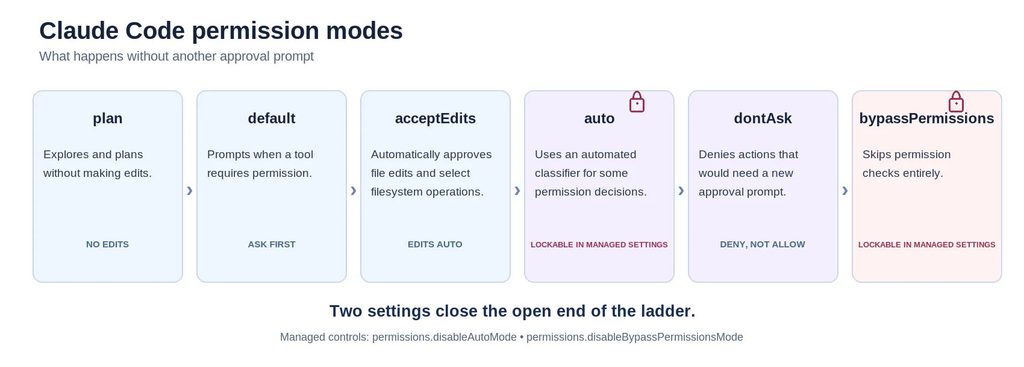
Risky default. Claude Code’s six permission modes run from cautious to open. default asks on first use of each tool, plan explores without editing, acceptEdits approves file edits and common filesystem commands, auto swaps routine prompts for a background classifier, and dontAsk denies anything that would prompt. At the far end sits bypassPermissions, the mode behind the –dangerously-skip-permissions flag.
On the record. That flag already has a malware history. In the Nx “s1ngularity” compromise of August 2025, the poisoned npm package looked for installed AI CLIs and ran claude –dangerously-skip-permissions, gemini –yolo, and q –trust-all-tools with a prompt to inventory wallets, keys, and .env files. Stolen GitHub tokens then flipped more than 6,700 private repositories public, by Wiz’s count. The agent did what it was told.
What to set. Put the controls in managed settings, which user and project settings can’t override. Set permissions.disableBypassPermissionsMode to disable, and permissions.disableAutoMode too if your review process can’t absorb classifier-approved commands. Write deny rules first, since evaluation runs deny, then ask, then allow; a Read(./.env) deny also blocks cat .env, because Claude Code applies read rules to the file commands it recognizes in Bash.
Recognition has edges, and the sandbox covers them. It’s off by default, runs on Seatbelt on macOS and bubblewrap on Linux, and can be enforced centrally. Its default read scope is the catch: commands can still read most of the machine, “including credential files such as ~/.ssh and ~/.aws/credentials.” A production kubeconfig in ~/.kube is readable too. That’s agent reach in one file path. Add sandbox.filesystem.denyRead entries for credential paths, or turn on permissions.blockReadsOutsideWorkingDirectories, and keep the network allowlist short.
MCP. Here only the developer-side config matters. Claude Code’s managed MCP controls can deploy a fixed server set through managed-mcp.json, or filter what developers add with allowedMcpServers and deniedMcpServers; pairing the allowlist with allowManagedMcpServersOnly makes it authoritative. Keep tokens out of the config file. The protocol itself belongs to the AI agent security guide.
GitHub Copilot Data Privacy: Business vs. Individual Plans
Data terms. The fact that matters most is dated April 24, 2026. From that day, GitHub uses interaction data from Copilot Free, Pro, and Pro+ (inputs, outputs, code snippets, and associated context) to train its models unless the user opts out under Privacy in Copilot settings. Earlier opt-outs carried over. Copilot Business and Enterprise are excluded by contract, and GitHub’s FAQ adds that it doesn’t train on any paid organization’s repositories, or on data from accounts that belong to one, whatever plan the user holds.
Risky default. So the exposure is narrower than the headlines, and easier to miss: a developer using a second, personal GitHub account with Copilot Pro on company code, or company code hosted on GitLab, Bitbucket, or a free GitHub organization. Business seats carry their own gap. GitHub’s content exclusion docs state that “GitHub Copilot CLI and Agent mode in Copilot Chat in IDEs do not support content exclusion.”
On the record. In June 2025, Legit Security found CamoLeak, rated CVSS 9.6: hidden comments in a pull request told Copilot Chat to search the victim’s private repositories for secrets, then leak them through GitHub’s own Camo image proxy, one pre-generated image URL per character. Copilot had the victim’s read access, so the injected instructions did too. GitHub fixed it on August 14, 2025 by disabling image rendering in Copilot Chat.
What to set. Put developers on Business or Enterprise seats, and block every other account at sign-in. GitHub built a control for exactly this: for enterprises on Enterprise Managed Users, a corporate proxy that adds the sec-GitHub-allowed-enterprise header stops people on your network from using GitHub.com with accounts your enterprise doesn’t own. When GitHub’s own answer to personal accounts is a network header, the account boundary is no longer an IDE setting. It’s a session question. Configure content exclusion anyway, and turn on push protection.
AI IDE Security: Extensions, Plugins and Supply-Chain Risk
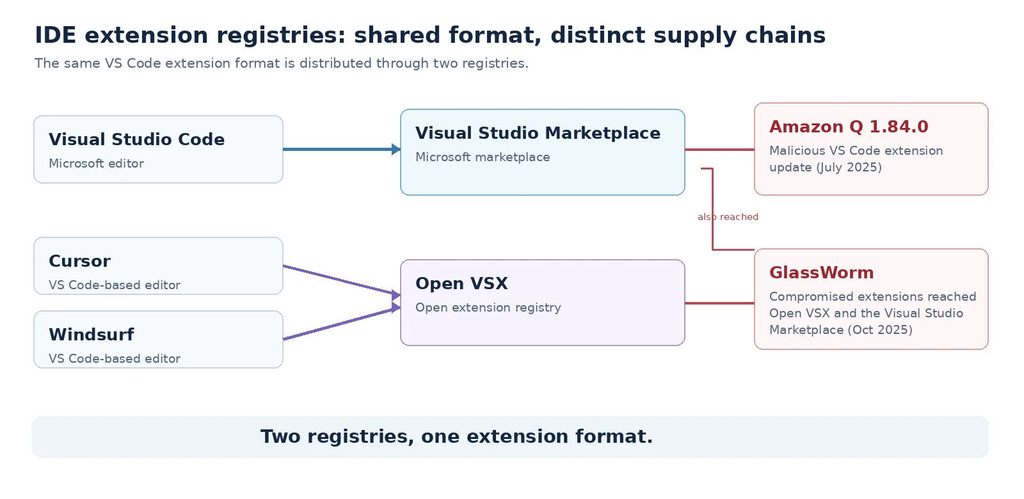
The editor is a platform, and its registry is part of your supply chain. Visual Studio Code installs from Microsoft’s Visual Studio Marketplace, whose terms limit it to Microsoft products. Cursor, Windsurf, and other VS Code forks generally install from Open VSX, the Eclipse Foundation’s open registry. Same extension format. Different review.
Both registries have shipped malicious code. In July 2025, version 1.84.0 of the Amazon Q Developer extension for VS Code, itself an AI coding assistant, went out with injected code designed to call the Q Developer CLI; AWS says it failed to run only because of a syntax error.
In October 2025, GlassWorm hid self-propagating malware in invisible Unicode inside compromised Open VSX extensions, plus one on Microsoft’s marketplace, roughly 35,800 downloads, with Solana and Google Calendar as command channels. No public report confirms Cursor victims. Cursor now routes Open VSX installs through its own marketplace proxy, which runs automated malware and supply-chain analysis before offering an extension, and its docs still tell enterprises to add allowlists and install cooldowns on top.
Rules files are the quieter route. Pillar Security’s Rules File Backdoor research, published in March 2025, hid instructions for Cursor and Copilot inside rules files using zero-width joiners and bidirectional markers that stay invisible in a GitHub pull request review, so a team that copies a rules template from a public repo imports lines nobody can see. In an AI IDE, the keys an extension inherits include model API tokens, the agent’s terminal, and every repo the developer opens: the AI-era version of extensions that inherit the keys.
A Policy for Sanctioned AI Coding Tools
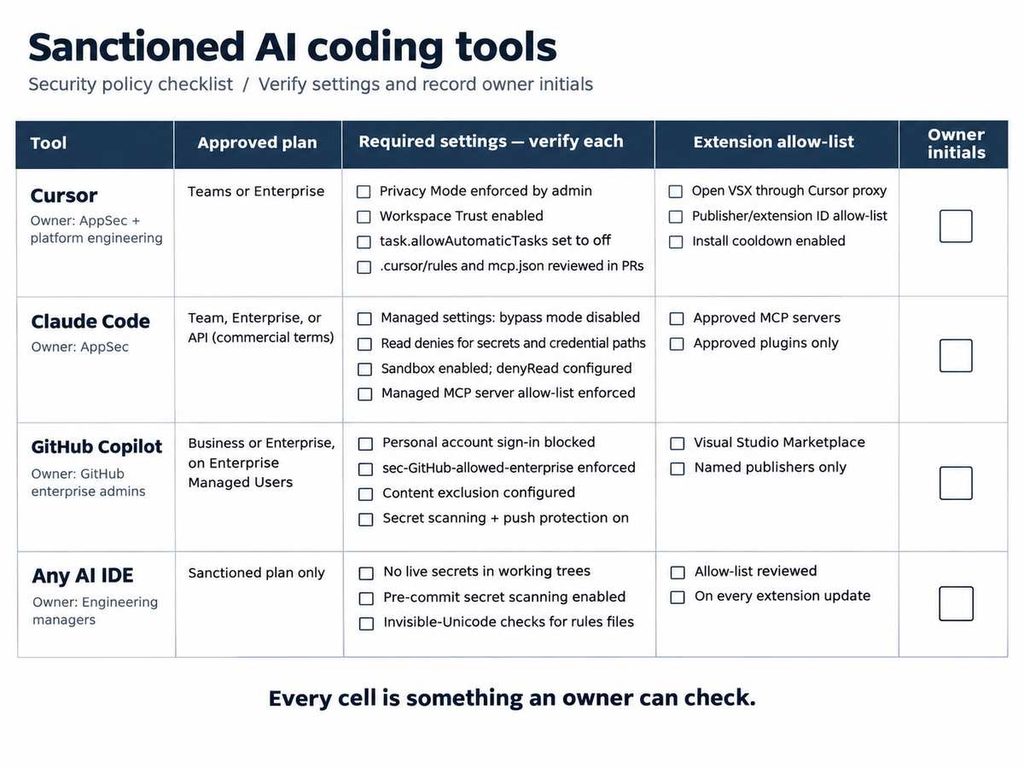
A sanctioned tool stays sanctioned only as long as its settings hold. Write the policy as one row per tool, and make every cell something an owner can check.
| Tool | Approved plan | Required settings | Extension source allow-list | Review owner |
| Cursor | Teams or Enterprise | Privacy Mode enforced by admin; Workspace Trust on; task.allowAutomaticTasks off; .cursor/rules and mcp.json reviewed in pull requests | Open VSX via Cursor’s proxy; enterprise allowlist by publisher or extension ID; install cooldown on | AppSec with platform engineering |
| Claude Code | Team, Enterprise, or API under commercial terms | Managed settings with bypass mode disabled; deny rules on secrets paths; sandbox on with sandbox.filesystem.denyRead for credential paths; managed MCP allowlist | Approved MCP servers and plugins only | AppSec |
| GitHub Copilot | Business or Enterprise on Enterprise Managed Users | Personal-account sign-in blocked via sec-GitHub-allowed-enterprise; content exclusion set; secret scanning with push protection | Visual Studio Marketplace, named publishers only | GitHub enterprise admins |
| Any AI IDE | Sanctioned plan only | Live secrets kept out of working trees; pre-commit secret scanning; invisible-Unicode check on rules files | Allow-list reviewed on every extension update | Engineering managers |
Every row is enforced inside the tool or the repository, with one exception: which account the developer signs in with, a choice made in a browser or desktop sign-in flow before the tool’s own settings ever apply. That’s where Red Access works. As a session-layer control, it restricts AI tools to corporate-sanctioned accounts at the browser and desktop sign-in flows these tools use, and applies DLP to source code pasted or uploaded into web AI sessions. CLI API-key authentication falls under the tool’s own managed settings.
What it doesn’t cover: a terminal agent reading ~/.kube/config, the shell commands that agent runs, and the server-side logic MCP servers execute on their own back end. Those belong to the IDE’s own permission rules — Claude Code’s managed settings, Cursor’s enforced Privacy Mode, GitHub content exclusion, secret scanning — alongside EDR and API-gateway controls. A control placed outside the shell doesn’t govern what happens inside it, and no session-layer product replaces the tool-side controls above, Red Access included.
Plan tier settles training. Agent reach settles the rest.
FAQs
Does Cursor store my code? It depends on Privacy Mode. With it on, Cursor says cached file contents are temporary and never used for training, and its model providers work under zero data retention agreements. With it off, Cursor may store and train on codebase data, prompts, and editor actions.
Is Claude Code safe to run on a work laptop? Yes, under commercial terms with managed settings in place. The default mode asks before each new tool. The trouble starts with bypassPermissions, a disabled sandbox, or a personal Max account. Lock bypass mode off centrally, enforce the sandbox, and deny reads on credential paths.
Does GitHub Copilot Free train on my code? By default, yes, since April 24, 2026, unless you opt out under Privacy in your Copilot settings. The same applies to Pro and Pro+. GitHub says it doesn’t train on paid GitHub orgs’ repositories, or on data from accounts that belong to one.
Can AI coding tools read .env files? Usually, yes. Cursor skips .env* files when indexing, but its agent’s terminal can still read them. Claude Code blocks cat .env under a Read deny rule, though an unrecognized command slips past unless the sandbox denies the path too. Keep live secrets out of the working tree.
Should we allow Open VSX extensions? Allow them by publisher, not by registry. Cursor and several other VS Code forks depend on Open VSX, so a blanket ban usually breaks the editor. Allow-list named publishers, pin versions, and review updates before they roll out. GlassWorm reached Open VSX in October 2025.
Do AI-assisted commits leak more secrets than human ones? GitGuardian’s data says they have. Its 2025 report found 6.4% of Copilot-enabled public repositories leaked a secret, against a 4.6% baseline. Its 2026 report saw Claude Code co-authored commits peak at about 2.4 times the human rate in mid-2025, then match the human baseline by December.
If you’re deciding which accounts your sanctioned AI coding tools may sign in with, see how Red Access enforces the account boundary at the browser and desktop sign-in flows these tools use →