MFA bypass almost never breaks the second factor. The user approves a real prompt, types a real code or taps a real security key. Then the attacker walks off with what that login produced: a session cookie or an OAuth token. Every technique below works against MFA that is doing exactly what it was designed to do.
Key takeaways about MFA bypass
- An adversary-in-the-middle attack leaves the factor intact. It relays the real sign-in and keeps a copy of the session cookie the identity provider issues afterward, so the attacker inherits an authenticated session.
- Device code phishing needs no fake page. Microsoft says the EvilTokens service compromised “more than 12,000 inboxes in over 10,000 organizations” by having victims finish real sign-ins on Microsoft’s own site.
- FIDO2 security keys and passkeys stop credential relay because they’re bound to the site’s origin. They don’t protect a token that has already been issued, and they don’t help if weaker fallback methods stay enabled.
- A password reset alone isn’t reliable containment. In Entra ID it leaves tokens from passwordless sign-ins alive, and Microsoft warns that access tokens can stay valid for up to an hour after revocation.
MFA bypass refers to any technique that gets an attacker into an MFA-protected account without defeating the factor itself. The attacker doesn’t crack the code or guess the push. They capture the session cookie or token the identity provider issues after the user authenticates, or they trick the user into authenticating the attacker’s own session.
Why MFA Alone Doesn’t Stop Account Takeover
MFA works. Microsoft’s announcement of its 2025 Digital Defense Report says “over 97 percent of identity attacks originate from mass password-guessing attempts,” and that phishing-resistant MFA “has proven to prevent up to 99 percent” of them. Those figures cover password guessing, not token theft. They’re the reason MFA belongs everywhere, and nothing in this article argues otherwise.
The limit is in what MFA checks. It verifies a person at one moment: the login. When the login succeeds, the identity provider hands back a session cookie for the browser, or an access token and a refresh token for an app, and from then on every request carries that artifact instead of the factor. This is the bearer problem. A session cookie or OAuth token works for whoever presents it, and nothing in it asks who’s holding it now.
That’s why attackers have moved their effort downstream of authentication, into what we’ve described as the browser session as the security perimeter. Every technique below follows the same lifecycle: a lure, a proxy or a flow abuse, capture of the token, replay, and persistence. Each stage is also a place where a defender can break the chain.
How Hackers Bypass MFA: The Main Techniques
How hackers bypass MFA comes down to six techniques. Two of them beat the factor itself. The other four go around it, either by capturing what the factor produces or by getting the victim to approve access for the attacker.
| Technique | What the attacker gets | MFA types it beats | ATT&CK ID | Control that stops it |
| MFA fatigue | An approved push, then a session | Push approval without number matching | T1621 | Number matching; phishing-resistant MFA |
| SIM swap / SMS interception | One-time codes sent by text or voice | SMS and voice | T1111 | Remove telephony factors |
| AiTM proxy | The password plus the post-MFA session cookie | Everything except origin-bound factors (FIDO2, passkeys, certificates) | T1557, T1539 | Phishing-resistant MFA; real-time site checks |
| Device-code phishing | Access and refresh tokens | All of them, passkeys included | T1528 (nearest fit) | Block the device code flow where unused |
| Pass-the-cookie | A live session with no sign-in at all | All of them (it happens after MFA) | T1550.004 | Token binding, short sessions, revocation |
| Consent / OAuth app abuse | Standing app access granted by the user | All of them (consent follows a real sign-in) | T1528 | Restrict user consent; admin approval |
MFA fatigue is the bluntest technique. The U.S. Cyber Safety Review Board’s 2023 review of Lapsus$ describes Lapsus$ and related groups “spamming employees with MFA prompts” until they said yes, sometimes “late at night, or during inconvenient times.” Picture a 1 a.m. flood of push prompts on a sleeping engineer’s phone. One tap ends it. In a few cases they also posed as help desk staff to coax the approval. Number matching closes most of this gap, because the user can’t approve a prompt without the code shown on the sign-in screen.
SIM swapping and SMS interception go after the delivery channel. Once an attacker controls the phone number, every texted code goes to them. CISA’s phishing-resistant MFA fact sheet says SMS and voice “should only be used as a last resort” and lists them as vulnerable to “phishing, SS7, and SIM swap” methods. Microsoft gives the same advice: “Avoid telephony-based MFA methods.”
Adversary-in-the-Middle Attacks: Phishing the Session, Not the Password
An adversary-in-the-middle attack puts a reverse proxy between the user and the real sign-in page. Take an Entra ID user who clicks a link to a lookalike domain. The page that loads looks like Microsoft’s sign-in because it is Microsoft’s sign-in, relayed through the attacker’s server. Same tenant branding. Same prompt. Cisco Talos puts it plainly: “From the perspective of the victim, the site they have connected to looks authentic.”
The proxy forwards the password to Entra ID, and Entra ID sends the real MFA prompt. The user approves it. Entra ID issues a session cookie, and the proxy keeps a copy on its way back. Microsoft documented this pattern in a July 2022 campaign that “attempted to target more than 10,000 organizations since September 2021” and fed business email compromise. Microsoft’s own verdict: “this is not a vulnerability in MFA.”
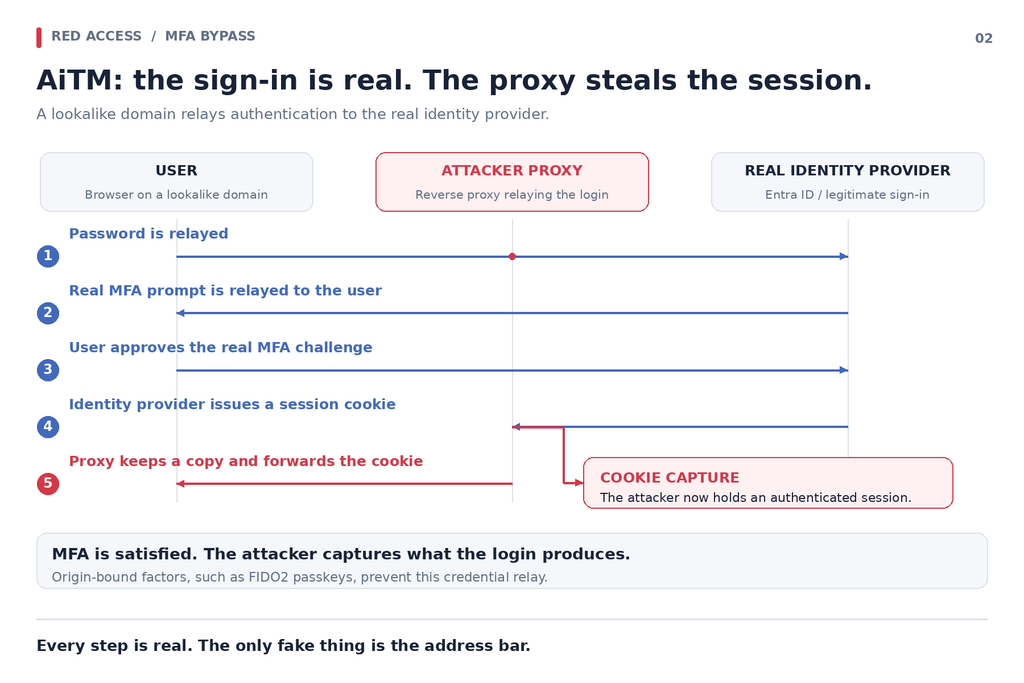
The proxy doesn’t want the password for later. It wants the session the password just opened. That’s why origin binding is the fix that breaks the relay itself. A FIDO2 key or passkey signs for the domain in the address bar. Talos notes that on a proxy domain, the location “will not match” the one the credential is bound to, and the sign-in fails. No match. No signature. No cookie.
Evilginx and Phishing Kits: How AiTM Went Mainstream
Evilginx is the reference implementation of AiTM phishing. Kuba Gretzky publishes it on GitHub as a “standalone man-in-the-middle attack framework” for capturing credentials “along with session cookies.” Its README says it “should be used only in legitimate penetration testing assignments with written permission.” At a high level, it’s a reverse proxy with a per-site template that tells it which cookies mark a finished login. The latest open-source release is 3.3.0, from April 2, 2024. Evilginx Pro is a separate commercial product sold to red teams.
Criminal operators turned the same idea into a subscription. Sekoia’s 2025 analysis of AiTM phishing ranked the most active kits from January to April 2025, a list that includes Storm-1167, NakedPages, Sneaky 2FA, EvilProxy and a tracked Evilginx cluster. Sekoia found that “NakedPages and EvilProxy” maintained “approximately 220 and 280 distinct active servers on average, from January 2024 to April 2025.” Running an AiTM campaign used to take real skill. Now operators rent it.
Detection works on the replay, not the proxy. For an IAM team, the useful signals are the ones Microsoft’s AiTM guidance points to: a sign-in with an unusual location, ISP or user agent, a session that reappears from a new IP address minutes later, and new inbox rules, MFA methods or device registrations right after it. Each of those fires after the cookie has already left. Detection is the backstop.
Pass-the-Cookie Attacks: Replaying a Stolen Session
A pass-the-cookie attack skips the sign-in entirely. The attacker loads a stolen session cookie into their own browser, and the app treats them as the user. MITRE ATT&CK tracks this as T1550.004, Web Session Cookie (version 2.0, modified May 12, 2026), noting that it “bypasses some multi-factor authentication protocols since the session is already authenticated.” Picture an Okta session cookie replayed from another country at 3 a.m. Okta sees no new sign-in at all, just a valid cookie.
CircleCI’s January 2023 incident report is the clean public case. Malware on an engineer’s laptop stole “a valid, 2FA-backed SSO session.” The attacker used it to “impersonate the targeted employee in a remote location” and reach “a subset of our production systems.” The malware’s collection method belongs in a separate discussion of infostealers. What matters here is the replay. One cookie. MFA already satisfied. Production reached.
This is the bearer problem in its purest form. Defenders look for the seams a replay leaves, such as impossible travel, an unfamiliar device fingerprint or a session that suddenly runs from a datacenter, and an attacker who routes traffic through a proxy near the victim blunts the location-based ones. And replay is no longer the only path. Our research on session theft shows attackers increasingly operating the session on the victim’s own device, where there’s no second location to catch.
Token Theft Attacks Across SaaS and Desktop Apps
One of 2026’s most widely used MFA bypass services didn’t need a fake page at all. Microsoft’s September 2026 EvilTokens report describes a phishing-as-a-service platform that emerged in February 2026. It used AI to tailor lures and to scan compromised inboxes for high-value targets, and it “compromised more than 12,000 inboxes in over 10,000 organizations worldwide.” Microsoft’s Digital Crimes Unit then worked with partners to disrupt its infrastructure.
EvilTokens abused the OAuth device code flow, the sign-in method Microsoft built for input-constrained devices “such as a smart TV, IoT device, or a printer.” The attacker starts the flow and gets the code to the victim. Storm-2372 hid it in fake Teams meeting invitations. EvilTokens used emails across 44 themes, from invoices to RFPs to shared files, and a landing page with a “Copy Code” button that redirects to microsoft.com/devicelogin. That page is real. So is the MFA. The tokens go to the attacker.
Microsoft’s April 2026 analysis of a related campaign says it produced “valid access and refresh tokens without password theft.” The campaign also generated codes at the moment of the click to get around the 15-minute expiry. Microsoft calls it “a significant escalation” since Storm-2372 in February 2025.
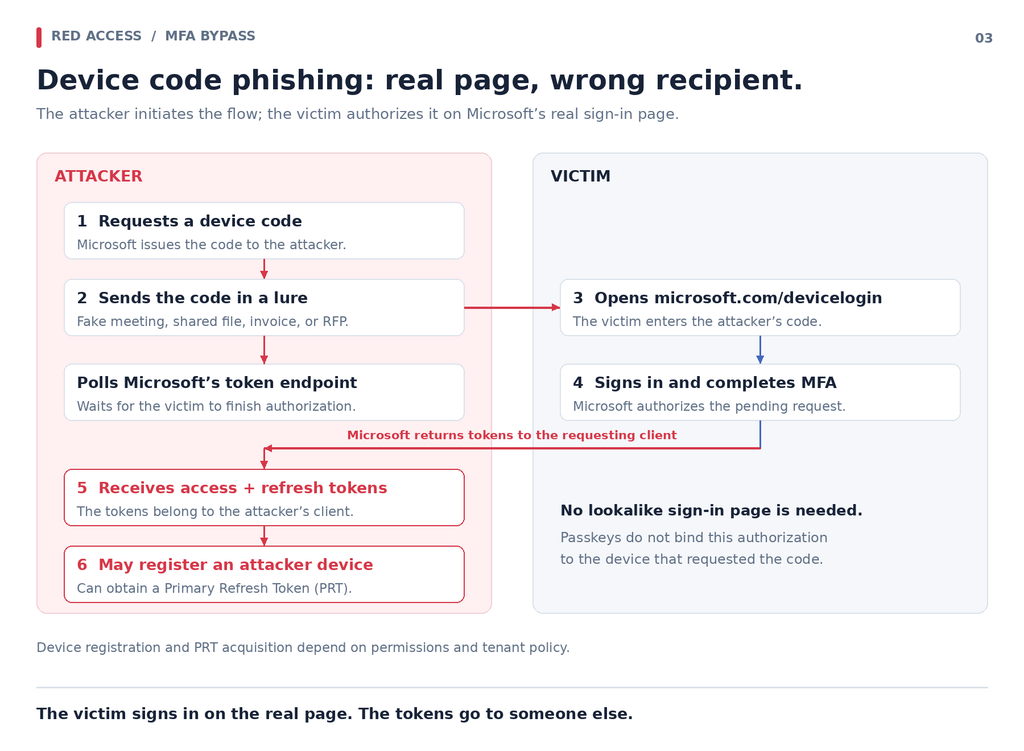
The token theft attack doesn’t end at the inbox. A refresh token keeps minting new access tokens, and Entra ID refresh tokens last 90 days by default. In some cases, Microsoft saw attackers register new devices “within 10 minutes” to get a Primary Refresh Token, the Windows single sign-on credential for Entra-connected apps on that machine. Then come inbox rules and Microsoft Graph reconnaissance. A malicious OAuth app with user consent gets the same standing access with no device code at all. That’s why SaaS app security has to cover what happens after the token is issued.
How to Stop MFA Bypass: Phishing-Resistant MFA, Session Controls and Real-Time Site Checks
Phishing-resistant MFA is the strongest single fix, and it comes first. CISA calls it “the gold standard”. NIST’s SP 800-63B-4, finalized July 31, 2025, now covers syncable authenticators, the category that includes synced passkeys. The rest of the list, in priority order, covers what that standard can’t reach:
- Phishing-resistant MFA everywhere, admins first. Move users to FIDO2 keys, passkeys or certificate-based sign-in, and remove SMS, voice and plain push as fallbacks. Cisco Talos, citing Duo telemetry, says WebAuthn still makes up “a very low percentage of all MFA authentications.” Rollout is the hard part.
- Block the device code flow where it isn’t used. Microsoft recommends “blocking device code flow wherever possible” through Conditional Access. If Teams devices need it, scope the exception to those Teams device resource accounts.
- Bind tokens and shorten sessions. Entra Token Protection is generally available for native apps on Windows. Browser support is still a preview limited to selected web apps. Shorter sign-in frequency on sensitive apps narrows the replay window.
- Revoke and monitor refresh tokens. Call revokeSignInSessions on any suspected compromise. Microsoft warns that access tokens can survive “for up to an hour” after revocation and recommends temporarily disabling the account. Alert on new inbox rules and device registrations.
- Check the site in real time, inside the session. Red Access inspects the page where the credential is entered, whether it renders in the browser or inside a desktop app with an embedded browser, including surfaces such as Teams, Outlook, and Slack. That lets policy catch a lookalike AiTM proxy domain and block credential entry before the password is submitted. No browser replacement, no extension rollout, no additional endpoint agent. The limit matters: session-layer inspection can stop credential entry on a lookalike proxy page, but it doesn’t stop device code phishing when the victim authenticates on Microsoft’s real page, and it doesn’t revoke tokens that have already been issued.
- Require a compliant device in Conditional Access. A replayed cookie fails on an attacker’s laptop that isn’t enrolled.
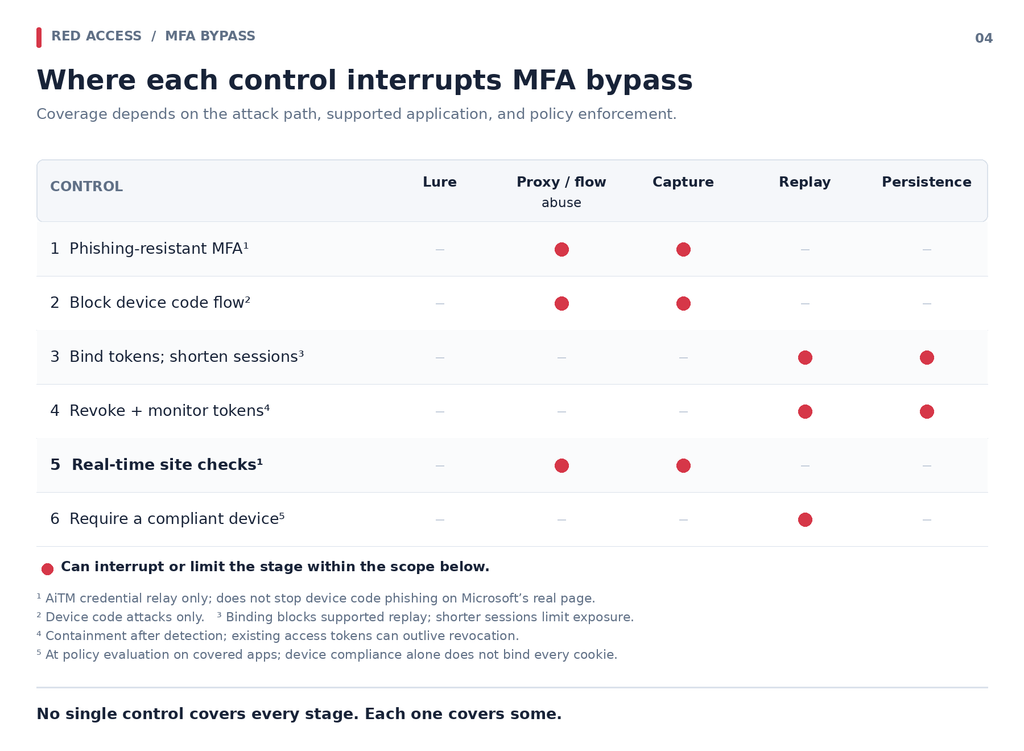
Each control has an edge. Real-time site checks stop a user at a lookalike AiTM page. They don’t stop device code phishing, because the victim is on Microsoft’s real page. Token Protection doesn’t cover most browser sessions yet. Passkeys don’t help once a token has been issued. Layering helps only if each control is assigned to the stage it actually breaks. That’s the logic behind a zero trust approach to user error: assume a user approves the wrong thing sooner or later.
The bearer problem moves wherever the login hands off its token. Session-layer controls watch that handoff: which site asked for the credential, and where the session goes next. Email filters and URL reputation lists do what they can at the perimeter, but the credential prompt itself renders on the device, inside the session, after the email layer has done its job. That’s where real-time phishing protection sits — on the page where the password is typed, in both the browser and the desktop apps with embedded browsers that attackers increasingly target. It works alongside phishing-resistant MFA rather than replacing it. Stronger factors make the front door harder to open. Something still has to watch what comes out of it.
FAQs
Can passkeys be bypassed? Not by an AiTM proxy, because a passkey is bound to the real site’s origin and won’t sign for a lookalike domain. Passkeys can still be sidestepped. Device code phishing has the victim sign in on Microsoft’s real page, stolen session cookies skip sign-in entirely, and attackers target any weaker fallback method that stays enabled on the account.
Is number matching phishing-resistant? No. CISA’s fact sheet lists push with number matching as “resistant to push bombing” but still “vulnerable to phishing attacks.” On an AiTM page, the proxy relays the number from the real sign-in screen, the user types it in, and the session cookie is captured the same way. Number matching fixes MFA fatigue. It doesn’t fix relay.
Is Evilginx illegal to use? Evilginx is open-source software, and its README says it “should be used only in legitimate penetration testing assignments with written permission from to-be-phished parties.” Using it against accounts you aren’t authorized to test is unauthorized access under computer-crime laws such as the U.S. Computer Fraud and Abuse Act. Get a written scope and your legal team’s sign-off before any test.
Does resetting a password end a stolen session? Not reliably. In Entra ID, a user’s password change revokes refresh tokens and cookies issued through a password sign-in, but tokens from passwordless sign-ins stay alive, and issued access tokens run until they expire. Revoke everything with revokeSignInSessions. Microsoft warns access tokens may survive up to an hour, so it recommends temporarily disabling the account, then checking for new inbox rules, devices and MFA methods.
Does Conditional Access stop MFA bypass? Partly. Requiring a compliant device blocks a cookie replayed from the attacker’s own laptop, and blocking the device code flow removes the EvilTokens path. Conditional Access only governs apps that sign in through Entra ID, though, and it can’t tell that the user typed their password into a proxy. That check has to happen at the page itself.
Can you turn off the device code flow entirely? In most tenants, yes. Microsoft recommends blocking it wherever possible with a Conditional Access policy. Some Teams devices still rely on it. For those, Microsoft advises scoping the exception to the specific Teams device resource accounts and excluding the Device Registration Service, rather than leaving the flow open to every user.
If you’re mapping where your MFA defenses end and the session begins, see how Red Access inspects the sign-in page where credentials are typed, in the browser and in the desktop apps that render them →