Red Access Wins Globee Award for Innovation, Named Gold Winner and Best of Category for Cybersecurity Product of the Year


Share:


Protect work across browsers, AI, messaging, and more

Securing browser activity

Enterprise Browser Alternative
Protection Without Friction
STOP
THE CHASE


Safe Browsing with Red Access

Red Access Data Loss Prevention (DLP)

Red Access Browser Extension Protection

Red Access SaaS Security

Secure Contractor & BYOD Remote Access

Adopt cutting-edge technologies like WebView2 without sacrificing security

Control GenAI Use Without Blocking Innovation

Streamlined, frictionless web security

Stop credential theft and spoofed sites in real time

SSE Security Without Replacement

Govern Vibe-Coded Apps
STOP
THE CHASE

Lorem ipsum dolor sit amet,
consectetur

Lorem ipsum dolor sit amet,
consectetur

Lorem ipsum dolor sit amet,
consectetur

Lorem ipsum dolor sit amet,
consectetur

Lorem ipsum dolor sit amet,
consectetur
Lorem ipsum dolor sit amet,
consectetur
STOP
THE CHASE
Share:

Most enterprises shopping for a VDI alternative aren’t trying to retire virtual desktops. They’re trying to stop paying for a full Windows session so a contractor can open a CRM. Those are different projects. This guide splits the estate by what each population actually reaches, then maps each slice to the control that fits it.
Key takeaways
A VDI alternative is any way of giving contractors, offshore teams and BYOD users access to corporate apps without standing up a virtual desktop of your own for each of them: an enterprise browser, ZTNA, desktop-as-a-service, or agentless session-layer controls. Which one fits depends on what the user reaches, not on which vendor is up for renewal. Web and SaaS work rarely needs a virtual desktop. Legacy Windows thick clients, GPU workloads and data that must never render on the device still do.
Many VDI replacement projects start with a calendar. On July 1, 2024, KKR closed its roughly $4 billion acquisition of Broadcom’s End-User Computing division, and Horizon has since been rebranded Omnissa Horizon. Citrix then made cloud licensing mandatory. File-based licenses expired on April 15, 2026, leaving the cloud License Activation Service as the only way to license on-premises Citrix components. A forced licensing migration is when a renewal gets questioned.
Most buyers are repricing within the category. Parallels’ 2025 State of Cloud Computing Survey of 600 IT professionals, fielded in December 2024, found 63% of midsize companies actively exploring new VDI or DaaS providers, with rising costs the top driver at 43%. That churn gets argued product against product, seat price against seat price. This guide argues it one layer down. The question isn’t which desktop to renew. It’s which populations need a desktop at all.
The third pressure is the gateway. An internet-facing VDI gateway is a patching obligation on someone else’s clock. CISA advisory AA23-325A (November 21, 2023) described LockBit 3.0 affiliates exploiting CitrixBleed on NetScaler appliances to take over legitimate user sessions without a password or MFA. When CitrixBleed 2 was added to CISA’s catalog of actively exploited flaws on July 10, 2025, federal agencies got a one-day deadline. That cost never appears on a seat quote.
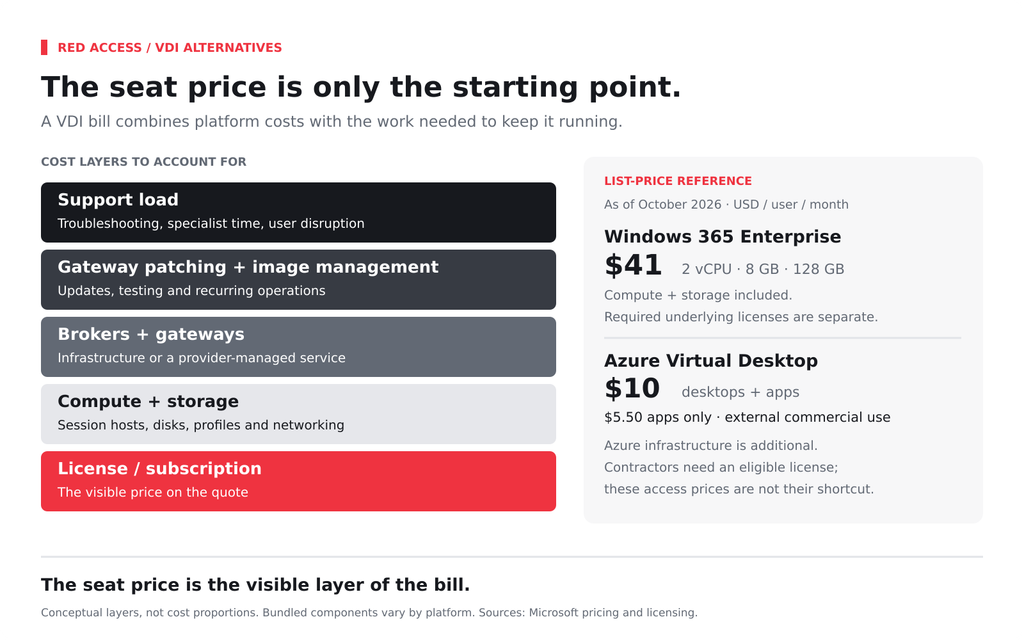
There’s no neutral, dated per-user VDI cost. Any single number you’ve seen describes someone else’s estate. What can be dated are list prices and the components stacked on top of them. As of October 2026, Microsoft lists Windows 365 Enterprise at $41 per user per month for 2 vCPU, 8 GB RAM and 128 GB storage, $66 for 4 vCPU and 16 GB, $132 for 8 vCPU and 32 GB, and $537 for GPU Standard. Compute and storage are included; the Windows E3, Intune and Entra ID P1 licenses Microsoft requires underneath are billed separately.
Azure Virtual Desktop looks cheaper, and the catch is eligibility. Its per-user access pricing, $10 a month for desktops and apps or $5.50 for apps only as of October 2026, is sold for external users, with Azure compute and storage billed on top. Microsoft’s licensing documentation says it “can only be used for external commercial purposes, not internal purposes” and “isn’t a way to enable external guest user accounts.” Its definition of internal users explicitly includes “external vendors or contractors.” Each contractor needs an eligible Windows or Microsoft 365 license, plus the Azure capacity behind the session.
The rest of the bill sits outside any price page: brokers, gateways, image management, the patch cycle above and the support load. Nexthink’s December 2024 survey of 1,000 frontline IT workers found 31% reporting daily VDI issues that need L3 specialist support, with application failures (54%) and slow performance (47%) among the most reported problems. The same survey found 95% believe VDI offers an equal or better experience than desktops. Users can tolerate VDI and still cost you a specialist every morning.
VDI for contractors earns its place for real reasons. The data stays in the data center. Beyond the client, nothing corporate lands on a laptop you don’t own, offboarding is one entitlement change, and the same published desktop works from almost any device. For a 90-day development contractor who needs GitHub, Jira and a staging console, that’s a clean answer to a messy question.
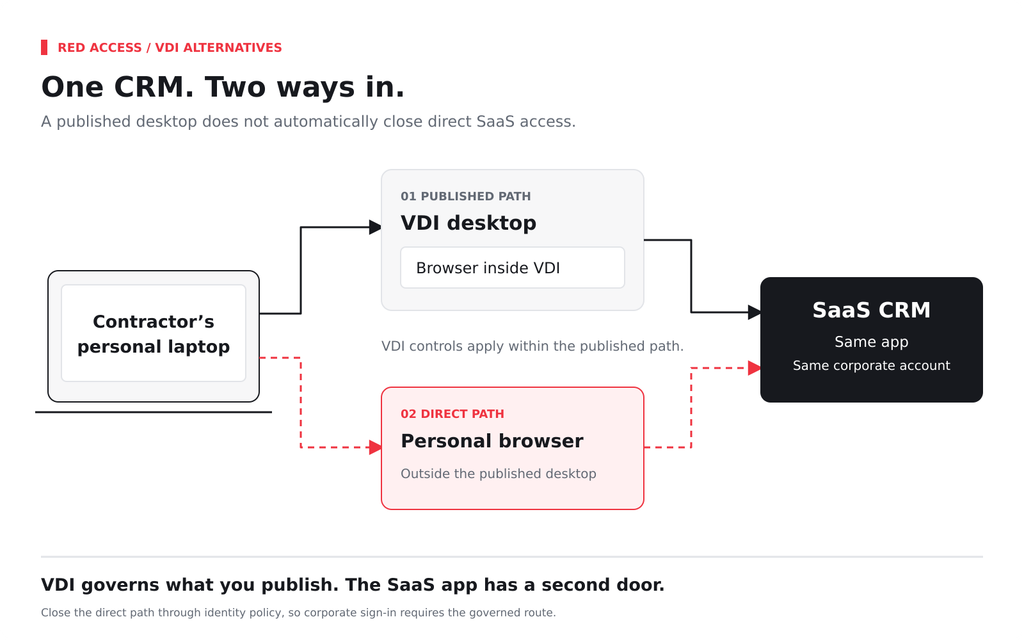
What it doesn’t solve is proportion. An offshore contact-center team working only in a CRM and a ticketing tool receives a full Windows session so it can open a browser inside it. Every seat needs capacity before anyone starts, and every keystroke makes a round trip to the data center before the screen updates. And VDI governs only what you publish. If the CRM is SaaS, the agent can often reach it straight from a personal browser unless identity policy closes that path, one of the third-party access risks that outlives the desktop.
Call this the reach test. Sort each population by what it actually reaches: web and SaaS apps, legacy Windows apps, or data that must never render on the device. Only the second and third need a virtual desktop. The web slice can move to a lighter control, the model behind secure BYOD and contractor access without VDI.
Each of the four is a serious answer to part of the problem. Island says its browser “replaces traditional VDI by securing work at the browser layer,” installed locally and managed from the cloud. Venn’s Blue Border goes further onto the device, with “a single lightweight software install” that creates a company-controlled enclave. Both place a managed layer on the endpoint, which is where rollouts tend to slow, the pattern behind why enterprise browser deployments stall. The enterprise browser alternative page covers the route that skips the install.
The vendors selling the replacement are also the clearest about its edges. Zscaler wrote that ZPA had “become a direct replacement of VDI,” then titled the sequel “From VDI replacement to complementary use,” describing a hybrid with “VDI-only access to third parties.” Gartner’s April 2025 prediction has a quarter of enterprises deploying a secure enterprise browser by 2028, framed as a way to “complement or reduce reliance on VPNs and VDIs.” When the replacement vendors publish the hybrid, the split stops being a contrarian position. It’s the category’s own map.
| Option | What the user reaches | Where data lives | Install on the device | Cost model | Contractor onboarding | What it doesn’t cover |
| Enterprise browser | Web and SaaS apps opened in that browser | On the device, inside the managed browser | A new browser, or a local enclave for workspace products | Typically per-user subscription | Install the browser, then sign in | Apps outside that browser; Windows thick clients |
| ZTNA | Private apps and the path to them | On the device once rendered | A client connector, or clientless access for web apps | Typically per-user subscription | Connector rollout or a browser portal | What the user does with data after access is granted |
| DaaS (AVD, Windows 365) | A full hosted Windows desktop | In the provider’s cloud | A remote desktop or web client | Per-user license plus compute (AVD); fixed per user (Windows 365 Enterprise) | Provision host pool capacity or a Cloud PC | Latency; it’s still a Windows desktop to manage and patch |
| Agentless session security | Web and SaaS apps opened through a shortcut in the device’s existing browser | On the device, with policy applied in the session | None; a shortcut or a configuration line | Typically per-user subscription | Send a link or push a managed setting | Sessions opened outside the shortcut; Windows thick clients; GPU workloads; keeping data off the device |
Read the table through the reach test, one population at a time. A contact-center team that lives in a CRM fits any of the lighter rows. The deciding questions are whether you can install anything on their devices and whether the same policy must also run inside the VDI you keep. For the install trade-off in detail, see our side-by-side with a managed browser.
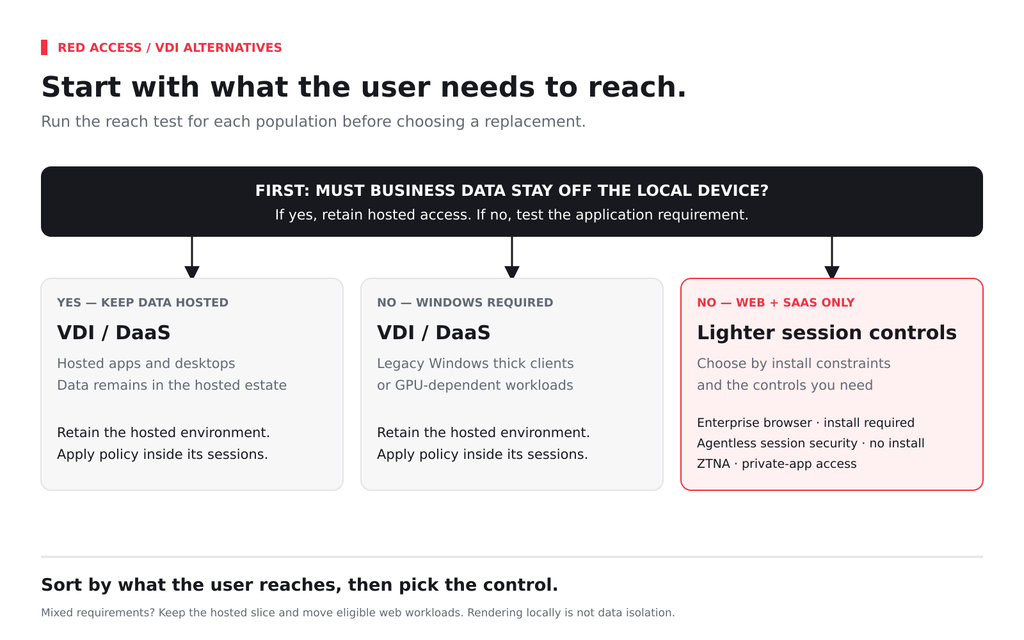
Citrix remains the most complete way to publish Windows applications to people you don’t manage, and nothing here changes that for a claims system or an ERP thick client. Citrix also sells a non-desktop path. Its Secure Private Access offers “secure access for Employees & Contractors to internal web and SaaS apps from managed or unmanaged devices without publishing a browser or using VPN.” A Citrix alternative for the web slice should clear five bars:
Omnissa Horizon estates face the same test with a different renewal letter.
AVD is a strong platform. Multi-session Windows 11, Microsoft-managed brokering and access rights bundled with eligible Microsoft 365 licenses make it the natural host for Windows workloads already in Azure. For an acquired company whose finance team runs a desktop accounting package, a host pool can be the fastest route to day-one access.
AVD stops being the answer when the population is contractors, web-only or seasonal. Contractors, because per-user access pricing covers external commercial use rather than your own workforce, so each contractor needs a qualifying license. Web-only, because you pay Azure compute to host a browser the user already has. Seasonal, because capacity sized for the peak sits idle much of the year, though autoscaling narrows that gap.
Microsoft’s own alternative is Windows 365, which has renamed Frontline as Windows 365 Flex and pitches it for “employees and contractors.” It removes the host-pool work. It doesn’t change what the user receives: a full Windows desktop, licensed by concurrent session. Run the reach test first. For a web-only population, both answer a question you didn’t need to ask.
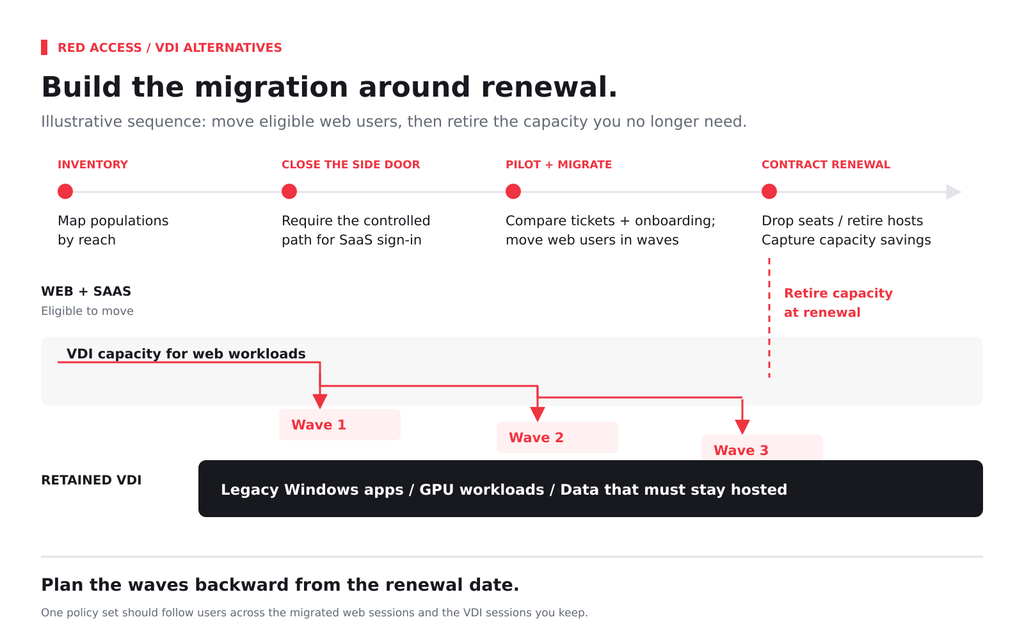
A move off VDI is a sequencing problem. Run it in this order:
Red Access sits on both sides of that split. Outside the virtual desktop, its session-layer engine applies policy to sessions a contractor opens through a shortcut in Chrome or Edge on their own device, with nothing installed. Inside the Citrix, AVD, and Horizon sessions that remain, the same engine applies session-layer controls without requiring an in-image agent binary to maintain across client releases or adding client-side decryption overhead to the VDI host. A certificate and a single configuration line in the golden image provide the footprint, while SSO enables per-user attribution instead of relying on a shared-host IP. Sessions opened outside the governed path aren’t inspected, which is why step 2 comes first. Red Access still doesn’t deliver Windows thick-client apps, replace a GPU workstation, or prevent data from rendering on an unmanaged device. Where data must never touch the device, VDI or DaaS still wins.
The virtual desktops that remain after the reach test still need session-layer controls for GenAI prompts, SaaS actions, and extensions. Traditional SSE agents can introduce additional complexity in VDI environments, where concurrent sessions, shared hosts, profile management, certificate and token rotation, and client updates already create operational overhead. Maintaining another inspection agent can mean additional golden-image updates, regression testing, and resource consumption across the VDI estate.
Red Access treats VDI as another surface for the same session-layer policy. Inspection happens inside the session after the browser or application has decrypted the traffic, avoiding client-side decryption overhead on the VDI host. SSO and in-session presence provide per-user attribution rather than relying on a shared-host IP. A certificate and a single configuration line can live in the golden image or be applied through a lean logon script, with no agent binary to maintain against each client release and no per-boot re-enrollment to manage. Nothing persists locally, helping keep FSLogix profiles lean and logon behavior predictable. Most policy evaluates locally in the session, with minimal added latency applied only to calls that need the cloud.
The practical result is one policy set that can follow the user both inside the virtual desktop and outside it, without creating a separate VDI deployment project just to extend the same controls to the sessions you keep.
VDI was built for the apps that can’t run anywhere else, and it still serves them well. Let it keep that job, and give the web slice a control sized for it.
If you’re splitting a Citrix, Horizon or AVD estate by what users actually reach, see how Red Access applies one policy inside and outside the virtual desktop →
Cybersecurity and Infrastructure Security Agency. (2023, November 21). #StopRansomware: LockBit 3.0 ransomware affiliates exploit CVE 2023-4966 Citrix Bleed vulnerability (Advisory AA23-325A). https://www.cisa.gov/news-events/cybersecurity-advisories/aa23-325a
Cybersecurity and Infrastructure Security Agency. (2025, July 10). CISA adds one known exploited vulnerability to catalog. https://www.cisa.gov/news-events/alerts/2025/07/10/cisa-adds-one-known-exploited-vulnerability-catalog
Citrix. (2026, April 13). License Activation Service: Get started with LAS (CTX695107). Citrix Support.
Citrix. (2023, April 10). Citrix Secure Private Access on-premises: Announcing general availability. Citrix Blogs.
Gartner. (2025, April 29). Gartner predicts 25% of organizations will use secure enterprise browsers to enhance remote access and endpoint security by 2028 [Press release]. https://www.gartner.com/en/newsroom/press-releases/2025-04-29-gartner-predicts-25-percent-of-organizations-will-use-secure-enterprise-browsers-to-enhance-remote-access-and-endpoint-security-by-2028
Island. (n.d.). Modern VDI alternative. Retrieved October 8, 2026.
Microsoft. (2025). Licensing Azure Virtual Desktop. Microsoft Learn. Retrieved October 8, 2026.
Microsoft. (n.d.). Azure Virtual Desktop pricing. Retrieved October 8, 2026.
Microsoft. (n.d.). Compare Windows 365 Enterprise licenses and pricing. Retrieved October 8, 2026.
Microsoft. (n.d.). Windows 365 Flex. Retrieved October 8, 2026.
Microsoft. (2026). What is Windows 365 Flex? Microsoft Learn. Retrieved October 8, 2026.
Microsoft. (2026). Windows 365 requirements. Microsoft Learn. Retrieved October 8, 2026.
Nexthink. (2024, December 5). Operational costs of VDI outweigh promised benefits, say IT workers [Press release]. https://nexthink.com/press/operational-costs-of-vdi-outweigh-promised-benefits-say-it-workers
Omnissa. (2024, July 1). Omnissa now independent following KKR acquisition [Press release].
Parallels. (2025, April 22). Parallels’ survey reveals midsize companies lead EUC market shift: 63% seek new VDI or DaaS solutions, 94% plan implementation within a year [Press release]. https://www.parallels.com/newsroom/news/press-releases/20250422-cloud-survey/
Venn. (n.d.). VDI replacement: Eliminate the latency of virtual desktops. Retrieved October 8, 2026.
Zscaler. (2024, March 1). Positioning Zscaler Private Access relative to VDI: Part 1. Zscaler Blog.
Zscaler. (2024, March 8). From VDI replacement to complementary use: Part 2. Zscaler Blog.
Insights & Ideas

|
AI agent security governs what agents can access, connect to, and do. Map agentic AI risks, MCP…

|
ChatGPT Enterprise keeps workspace data out of training. The risk is the personal account one tab away.…

|
Microsoft Copilot security is a permissions problem first. Map every Copilot surface, set Purview DLP, block what…