Highlights from the Red Access × Optec webinar on why “policy per app” is the governance model that broke in 2026 — and what it takes to replace it without an endpoint agent.
Key takeaways
- AI stopped being a website you can allow or block a year ago. It now lives inside Office and Salesforce, in desktop apps like ChatGPT and Claude, in browser extensions, in IDEs like Cursor and GitHub Copilot — and inside encrypted channels like WhatsApp. All at once.
- The unit of analysis has to change. Writing a policy per application doesn’t scale when 8,000+ apps ship AI features every quarter. Governance has to follow the activity — the prompt, the paste, the file upload — across every surface where it happens.
- Start with discovery, not policy. Get session-layer visibility across browsers and the hundreds of popular desktop apps where enterprise AI actually runs — Slack, Teams, WhatsApp, Cursor, Claude, ChatGPT Desktop — first, then apply controls where they genuinely matter, alongside what you already run in Purview and SSE, not instead of it.
A year ago, “AI security” meant one conversation: do we allow ChatGPT, do we block it, do we worry about what employees paste into the prompt box. That conversation is now obsolete. AI has become, in Dedi Shindler’s words, a moving target — a layer threaded through almost every tool an enterprise user already touches. In this session, Red Access’s Peter Bachelor and VP Product Dedi Shindler sat down with Richard Fels of Optec to talk through how the AI surface has changed, why traditional controls struggle to keep up, and what a session-layer approach looks like in practice. The full recording is below.
AI isn’t a destination anymore — it’s a feature inside apps you already trust
The core shift is simple and uncomfortable: AI is no longer a destination, it’s a capability bolted onto almost everything. Desktop clients like ChatGPT and Claude. Copilot embedded directly into Outlook, Teams, and Excel. AI features inside Salesforce and dozens of other SaaS apps your users already log into every day. Browser extensions. IDE assistants like Cursor and GitHub Copilot. Richard put the problem plainly: trying to block every AI tool on the market is a losing strategy — somewhere between 8,000 and 23,000 vendors depending on which count you believe, and the number grows every week. Block one, users route to another. Block them all, and your workforce either stops being productive or does the work on a personal laptop you have no visibility into. “AI is like water,” as Richard put it. “It always finds a route through.”
The second change runs underneath the first. Because vendors are building with AI, they ship features faster, which means your enterprise application environment is changing faster than security architecture was designed to absorb. “If security is going to play catch-up,” Dedi said, “we lost our ability to give good security to our customers.” The old model — maintain a list of sanctioned apps, write a policy per app, deploy a new agent each time a new category emerges — doesn’t hold up when the ground is moving this fast. The model that does work, in Dedi’s framing, is one “that is much more flexible, much less dependent on understanding every application individually, and follows the activity and the data.”
Traffic vs. action: why network logs miss the actual leak
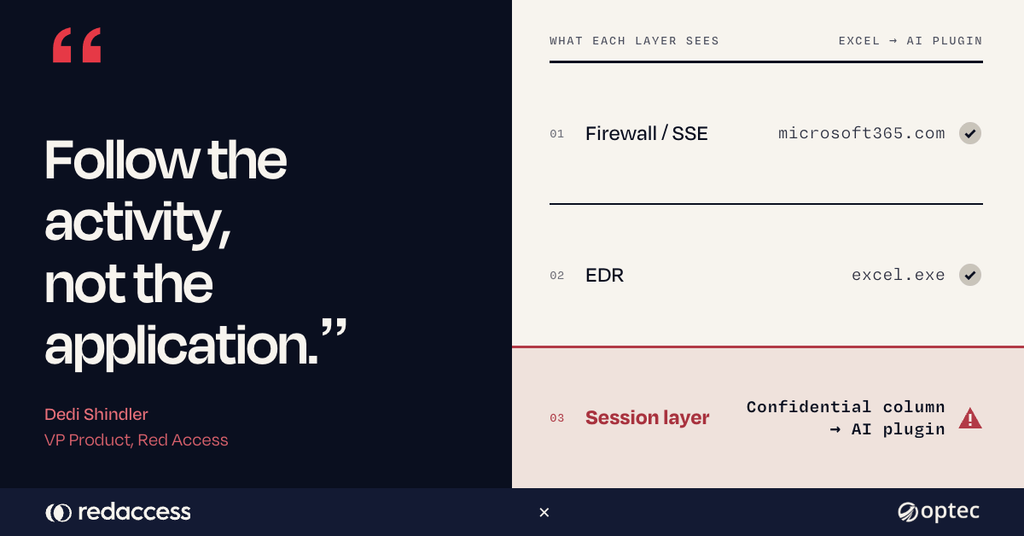
Most security stacks only see one slice of the picture. A firewall or SSE sees traffic — it can confirm a user connected to ChatGPT or Salesforce. EDR sees the endpoint — which process is running, which file was opened. Neither sees the thing that actually matters for AI risk: the interaction itself. What did the user type into the prompt? What did they paste? What was inside the file they uploaded? Did any of it include source code, customer records, a document labeled confidential in Purview?
That’s the session layer, and it’s where the work happens. Dedi framed the principle behind Red Access’s approach directly: “security policy follows the activity, not just the application.” The webinar then walked through three live examples that make the gap concrete:
A user types a sensitive prompt into ChatGPT in a normal browser tab. A firewall sees chat.openai.com. Red Access sees the prompt content and enforces policy before the information is sent — blocking the prompt itself, not the application. As Dedi put it during the demo: “the important point is not just that we know the user opened ChatGPT, but we can see that they are actually trying to submit.”
A user pastes confidential data into WhatsApp Web. The application is encrypted end-to-end over long-lived websockets, so a network tool can confirm “the user is on WhatsApp” but cannot inspect the action. A session-layer control can.
A user selects a block of spreadsheet data and sends it to an AI plugin embedded inside Excel. The endpoint sees Excel running. The network sees Microsoft 365 traffic. No external AI website gets contacted at all. From a classification-by-destination perspective, the risky action is invisible.
Keep Purview as the brain. Extend its reach where it can’t go.
Every Microsoft-heavy shop asks the same thing: we already invested in Purview — what’s the relationship? Richard was direct about the real-world constraint: Purview is powerful at classification, but “really time consuming” to tune, and once you’ve built it, you don’t want to rebuild it. The honest answer from the session was that Purview stays as the classification brain. It understands your data, it applies sensitivity labels, and if you’ve spent months on it, you shouldn’t rip it up. What a session-layer product adds is reach: when a document labeled confidential in Purview gets dragged into a public AI service, pasted into an encrypted messenger, or sent to an AI plugin inside Office, Red Access can recognize the label and enforce on it in places where Purview’s native enforcement doesn’t extend. “Purview stays as the classification policy brain,” Dedi said, “while Red Access extends the enforcement into places where that classification is still needed.” The classification stays yours. The enforcement surface just got wider.
Visibility before enforcement: why day-one blocking misses the point
The audience question that mattered most: how do I avoid rewriting our policy every time a new AI tool appears? Dedi’s answer wasn’t more policy. It was starting with visibility: “we start with visibility before asking the customer to build policies. The goal is to show who is using AI, what AI capability they’re using, through which channel, and what data is involved.” Once a security team can see the actual pattern, they can decide where governance is worth the effort and where it isn’t.
Richard’s team runs exactly this motion as a short, no-cost assessment: Red Access deployed in monitoring mode for about a week, producing a report at the end of what AI tools are running across the network, who the heaviest users are, and where the data exposure sits. In his experience, this is where most of the surprise lives — organizations consistently discover more AI in use than their firewall logs ever suggested, including embedded AI features inside tools already on the approved vendor list.
How session-layer inspection works without an endpoint footprint
One point worth pulling out, because it’s often the thing that kills a project before it starts: none of this requires a new endpoint agent, a replacement browser, or an extension rolled out across 20,000 machines. Richard was blunt on why that mattered for Optec: “we don’t like endpoint agents. It’s just painful.”
The architecture is deliberately hybrid. A lightweight OS-level configuration, pushed through standard tools like Intune, GPO, or MDM, acts as a local traffic router — it decides which sessions touch Red Access at all. Routine traffic (video, OS updates, trusted SaaS) continues to flow direct, with no backhaul and no latency hit. Only the sessions that actually matter for AI governance — GenAI tools, uncategorized destinations, sessions the policy flags for DLP — get selectively routed to the Red Access cloud. There, an in-flight session engine is delivered into the user’s browser or desktop app, where it inspects prompts, pastes, uploads, and extensions from inside the session itself — after local decryption, before the data leaves. That’s how the same control covers browsers, Slack Desktop, Teams, WhatsApp Desktop, Cursor, Claude Desktop, and most other modern AI-enabled apps without putting anything on the endpoint.
Richard summarized why Optec chose to partner with Red Access in one line: “a simple story for a complex problem” that could sit alongside existing Microsoft, Purview, and firewall stacks instead of demanding a stack-level rewrite. Agentless. Configuration-level rollout. BYOD and contractor coverage without touching the device. That’s the piece that makes the discovery motion possible in the first place.
Before you ask: the architecture questions worth answering upfront
How do you inspect prompts and encrypted apps without an endpoint agent or browser extension?
Through a hybrid session-layer architecture. An OS-level configuration selectively routes relevant AI and SaaS sessions to the Red Access cloud, while routine traffic stays direct. For browsers and modern desktop apps that cooperate with the OS trust store — Slack, Teams, WhatsApp Desktop, Cursor, Claude Desktop, most GenAI clients, IDE AI assistants — an in-flight engine runs inside the session itself, inspecting prompts, pastes, and file uploads after local decryption and before rendering. No kernel agent, no managed extension, no replacement browser.
Does this mean you’re backhauling and decrypting all our corporate traffic?
No. Unlike traditional cloud proxies that funnel everything through a central inspection point, Red Access routes selectively based on policy. The majority of enterprise traffic never touches our cloud, which is also why we don’t break modern protocols like WebSockets, HTTP/2, HTTP/3, and TLS 1.3 the way legacy SSL-inspection stacks do.
What about hard-pinned native desktop apps, or mobile?
Hard-pinned native apps that bypass the OS trust store fall back to network-layer control — route, block, log metadata. No agentless architecture can perform in-session inspection inside those apps; that would require a kernel-level agent, which is the exact cost most teams are trying to avoid in the first place. The practical trade-off: the overwhelming majority of where modern AI risk actually lives — browsers, SaaS, Slack/Teams/WhatsApp Desktop, GenAI clients, IDE AI — runs in environments the in-session engine covers natively. Mobile and non-web protocols are outside current scope.
How quickly can we run the one-week visibility assessment?
Because there’s no agent to package and no browser to replace, rollout happens at the configuration level in minutes to hours, not weeks. The assessment runs in passive monitoring mode on a pilot group or the full workforce, with no user-facing impact and no change to the existing stack.
Watch the full session
The full 40-minute conversation covers the regional view from Wales, more depth on the Purview integration, Richard’s vendor-evaluation criteria, and the live demo across browser, WhatsApp, and Excel. Worth it if any of this maps to what you’re seeing in your own environment.