A drive-by download used to mean an exploit kit firing at an unpatched plugin. Automatic browser updates and the death of Flash mostly ended that era. The term survived it. What it describes now is quieter: a website that talks the employee into taking the last step for it.
Key takeaways
- Most documented drive-by download campaigns since 2024 are user-assisted. The page doesn’t break the browser. It persuades the visitor to download, open or paste the payload, which calls for different controls.
- MITRE ATT&CK files the visit under T1189 Drive-by Compromise and the user’s action under T1204 User Execution. Mapping a campaign to both shows which control owns which step.
- Malvertising buys the top of the chain. A spoofed display URL or a verified-advertiser label can put a fake installer above the real vendor’s own search listing.
- No single control covers both kinds. Patching handles the exploit-only minority, OS hardening handles paste-and-run, and download controls handle the installer the user was talked into.
What Is a Drive-By Download?
A drive-by download is malware delivery that starts with an ordinary website visit: not an email attachment, not a cracked installer, but a page the employee meant to open. It comes in two kinds. In an exploit-only drive-by, loading the page is enough, because browser code runs the attacker’s payload with no further input. In a user-assisted drive-by, the page supplies a lure and the user completes delivery by downloading a file, running it, or pasting a command.
The definitions that rank today were written for the first kind. An exploit kit fingerprinted the visitor’s browser and plugins, picked a matching exploit and installed malware silently. Faster patch cycles and the retirement of browser plugins took most of that business away. That concession is real. Classic exploit kits have largely faded.
The delivery path didn’t fade with them. It moved. Modern campaigns put their effort into the lure, and they hand the final action to the person at the keyboard. Call that action the last step: the moment a file is saved and opened, or a command is pasted and run. Exploit-only drive-bys skip the last step. User-assisted drive-bys depend on it. Drive-by describes how the visitor arrives. It doesn’t describe who finishes the job.
How a Drive-By Download Attack Works, Step by Step
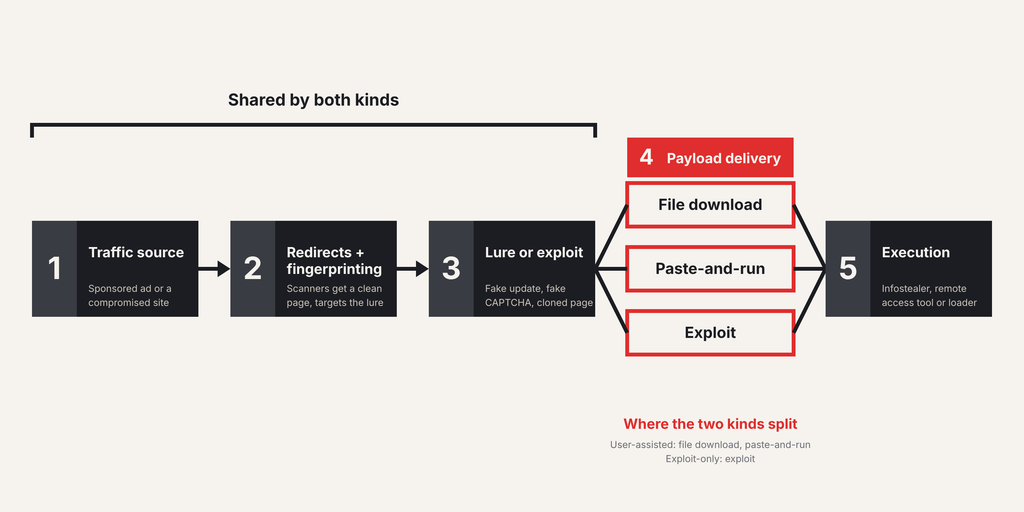
Every drive-by download attack runs through the same five stages. Picture an employee clicking the top sponsored result for a free PDF tool. Or a member opening their industry association’s WordPress site and meeting an “update your browser” banner. Same chain.
- Traffic source. A sponsored search result, an ad slot on a busy site, or a legitimate site the attacker has compromised.
- Redirect chain and fingerprinting. Intermediary domains check the visitor’s operating system, browser, location and IP reputation. Scanners get a clean page. Targets get the lure.
- Lure or exploit. Usually a lure: a fake update, a cloned download page, a fake CAPTCHA. Occasionally a browser exploit instead, the path behind Chrome zero-days.
- Payload delivery. A downloaded file, a command pasted into the Windows Run dialog or a terminal, or exploit code that writes to disk on its own.
- Execution. The payload runs, usually as an infostealer, a remote access tool or a loader.
Steps one through three happen in the browser. Step four is where the two kinds split. It’s also where coverage is thinnest.
Drive-By Compromise in MITRE ATT&CK
MITRE ATT&CK lists drive-by compromise as technique T1189 under Initial Access, describing an adversary who gains access “through a user visiting a website.” Its procedure examples run from APT28 and APT38 to SocGholish. Its listed mitigations are application sandboxing, exploit protection, restricting web-based content, updating software and user training.
T1189 covers the visit. The user-assisted half lands in T1204 User Execution, under the Execution tactic. Its sub-technique T1204.004 Malicious Copy and Paste names ClickFix outright.
| T1189 Drive-by Compromise | T1204 User Execution | |
| What the user does | Opens the page. Nothing else. | Downloads and opens a file, or pastes and runs a command |
| Recent example | Operation ForumTroll, March 2025 | ClearFake fake updates; ClickFix paste-and-run |
| Primary control | Browser patching and exploit protection | Download controls and OS hardening |
Malvertising: How Ads Deliver Drive-By Downloads
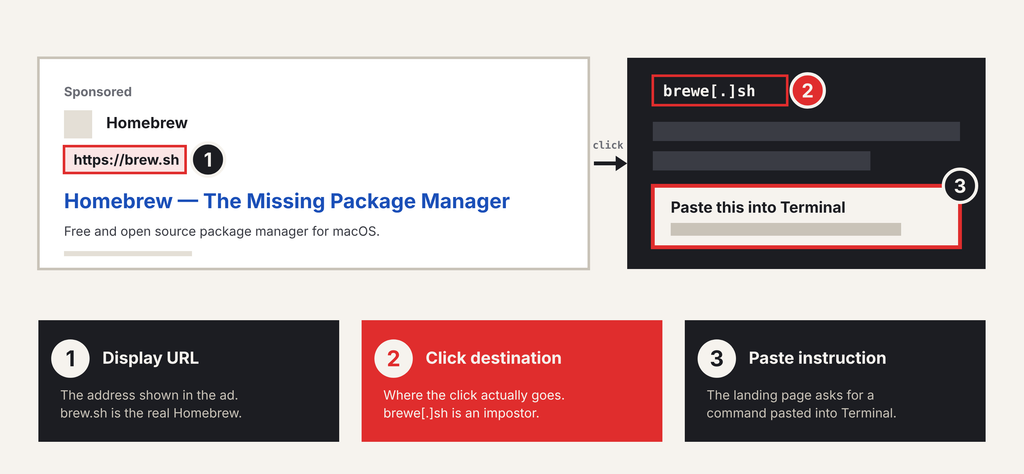
Malvertising is the use of paid ads to start a drive-by chain. The attacker buys a placement through a search ad auction or an ad network, then cloaks it: reviewers and crawlers see a harmless landing page, real visitors get redirected. Search ads allow a sharper trick. The display URL shows the vendor’s real domain. The click goes somewhere else.
Scale is hard to pin down. Google’s 2025 Ads Safety Report, published April 16, 2026, counts over 8.3 billion ads blocked or removed and 24.9 million advertiser accounts suspended that year. Those totals cover every policy violation, not malware alone. And they only count what got caught.
Two dated cases show the mechanics. Bitdefender reported on January 22, 2025 that a Google ad for Homebrew, the macOS package manager, displayed the real brew.sh address but led to brewe[.]sh. Visitors were told to paste an install command into Terminal. It installed AMOS Stealer. Malwarebytes documented a July 2024 ad for Google Authenticator, shown under an advertiser identity Google had verified, that delivered a signed DeerStealer file hosted on GitHub. Both payloads are infostealers that harvest credentials and session cookies.
Drive-By Download Examples From Recent Campaigns
Malvertising at scale, user-assisted download. Microsoft Threat Intelligence reported on March 6, 2025 a campaign detected in early December 2024 that hit nearly one million devices, consumer and enterprise. It began on illegal streaming sites carrying malvertising redirectors. The redirect chain ran four to five layers deep. First-stage payloads sat mostly on GitHub, with one each on Discord and Dropbox. The follow-on payloads were mostly Lumma or an updated Doenerium, often with NetSupport. Microsoft tracks it as Storm-0408.
Fake updates on compromised sites, from download to paste. Red Canary’s 2026 Threat Detection Report, covering 2025, describes SocGholish as “drive-by-downloads masquerading as software updates”: the user downloads the “update” and runs a malicious JavaScript file. ClearFake, a cluster that injects fake update prompts into compromised sites, changed its last step. Proofpoint observed it switching in early April 2024 to what became known as ClickFix: a fake error telling the visitor to copy a PowerShell script and run it. TA571 had used the lure since March 1. No browser download at all.
Exploit-only, and targeted. Kaspersky published Operation ForumTroll on March 25, 2025, after detecting a wave of infections in mid-March. Victims opened a personalized link, sent as an invitation to a scientific forum, in Google Chrome. “No further action was required to become infected.” A zero-day exploit escaped Chrome’s sandbox. Targets were media outlets, educational institutions and government bodies in Russia. The apparent goal: espionage. It’s the minority case on this list. Also the hardest to see.
How to Prevent Drive-By Downloads
Knowing how to prevent drive-by downloads starts with the chain. Each control acts on one step, and the list below runs in chain order. Patching closes the exploit. It doesn’t close the download.
- Patch every browser, embedded ones included (step three). Chromium-based and embedded browsers ship fixes on their own schedules, so track them separately. The Chromium vs. Chrome distinction matters here. Exploit protection covers the gap between disclosure and patch.
- Filter ads and URLs (steps one and two). Block ad domains at the DNS or proxy layer where policy allows, and apply URL reputation feeds at the gateway. Both cut traffic. Neither reliably catches a domain registered yesterday.
- Harden the OS against paste-and-run (step four). Disable the Run dialog for standard users through Group Policy, restrict PowerShell, and alert when a browser spawns a shell. It’s the layer that meets ClickFix most directly.
- Control downloads at the last step (step four). Block or inspect risky file types fetched from the web: installers, scripts, archives, disk images. Apply the policy to unmanaged and contractor devices too.
- Isolate high-risk destinations (steps three and four). Rendering untrusted pages away from the endpoint removes most exploit exposure, at a cost in latency and licensing. Weigh an alternative to remote browser isolation first.
- Train for the lure, not the link. One rule: no legitimate site asks you to paste a command or update your browser from a banner.
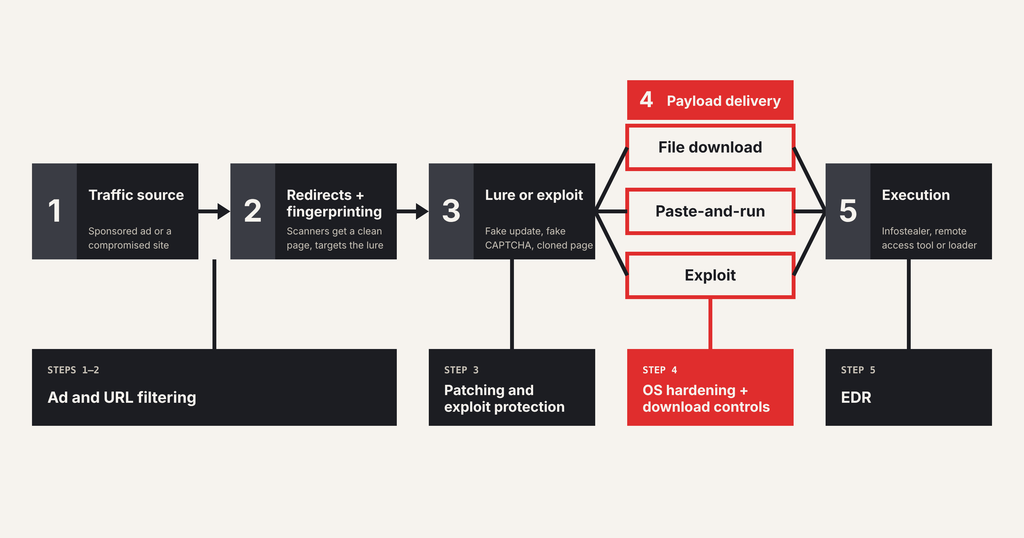
Where Session-Level Download Controls Fit
Session-level download controls sit at step four, inside the browser session where the file is requested. They see the file before it lands: its type, its source, the page that served it. That covers the fake update and the malvertised installer. It covers them on unmanaged and contractor devices too, because nothing is installed on the endpoint.
The boundary deserves the same plain statement. Applied to any session-level control, Red Access included, the chain shows two gaps. An exploit-only drive-by like ForumTroll never produces a download for a session control to judge; patching and exploit protection own that case. Paste-and-run chains such as ClickFix and the Homebrew ad execute through the Run dialog or a terminal, outside the session; OS hardening owns those. A session-layer control governs copy and paste inside the browser sessions it covers — the paste from a browser into ChatGPT, for example. It doesn’t follow a copy out to the Windows Run dialog or a Terminal, where the paste happens outside any browser session. That OS-level clipboard-to-execute flow belongs to the controls below the browser.
That second gap isn’t small. Microsoft’s 2025 Digital Defense Report ranks ClickFix as the most common initial access method in its Defender Experts notifications, at 47%. The claim here is narrower: for the installer an employee was persuaded to fetch, Red Access places risky download blocking inside the session, on managed and unmanaged devices alike, with no browser replacement, no extension rollout, and no additional endpoint agent. It’s one layer on the list above. The one at the last step.
FAQs
Can you get a virus just by visiting a website? Yes, but it’s rare. It takes an unpatched flaw in the browser or its sandbox, and the exploit-only cases documented recently have tended to target narrow groups, not the general public. A fully updated browser removes most of that exposure. The common risk is different. It’s a page that convinces you to download or run something yourself.
Do ad blockers prevent drive-by downloads? They help with one entry point. MITRE lists ad blockers under its Restrict Web-Based Content mitigation, because they stop code served through ads from loading. They do nothing against a compromised site’s injected script, or an organic search result that leads to a lure. At enterprise scale they need an exceptions process too. Some sites break.
Are Macs vulnerable to drive-by downloads? Yes. macOS checks downloaded apps through Gatekeeper and notarization, which raises the bar for a malicious installer. So Mac-focused campaigns ask the user to paste a Terminal command instead. A command that fetches its own payload doesn’t pass through the same download checks. AMOS Stealer is a frequent payload in that pattern.
What’s the difference between a drive-by download and phishing? Phishing reaches you: a message addressed to you, carrying a link or attachment. A drive-by download waits for you, on a site you chose to visit or an ad you chose to click. The two overlap when a phishing link points to an exploit page, as in targeted espionage campaigns, but the controls that stop each one differ.
Is a watering hole the same as a drive-by download? A watering hole is a targeted drive-by. The attacker compromises a site a specific group is known to visit, such as an industry forum or a supplier portal, and often serves the payload only to visitors from that group. Every watering hole uses drive-by delivery. Most drive-by downloads aren’t watering holes.
Does EDR stop drive-by downloads? EDR acts at execution, the final stage of the chain, and catches many payloads there. It struggles with what looks ordinary on first run: a validly signed file, like the DeerStealer sample in the fake Authenticator ad, or a PowerShell one-liner the user pasted personally. Treat it as the backstop. Not the first line.
If you’re mapping your stack against this chain, see how Red Access blocks the installer at step four — in the session, before it lands — across managed and unmanaged devices →